Traditional smartphone runtime tests often use video playback, web browsing or standby. Those tests remain useful, but they may not represent the bursty processor, memory, camera and network activity created by modern artificial-intelligence features.
A professional AI phone battery testing program should separate on-device inference, cloud processing and mixed workflows. It should control the model version, task input, network, display, temperature, software build and battery state while recording energy, performance and heat.
This guide is intended for replacement-battery brands, repair chains, refurbishers, wholesalers and validation laboratories. It does not set universal runtime or temperature limits; those must be approved for the actual device and battery.
Define the AI Feature Before Testing
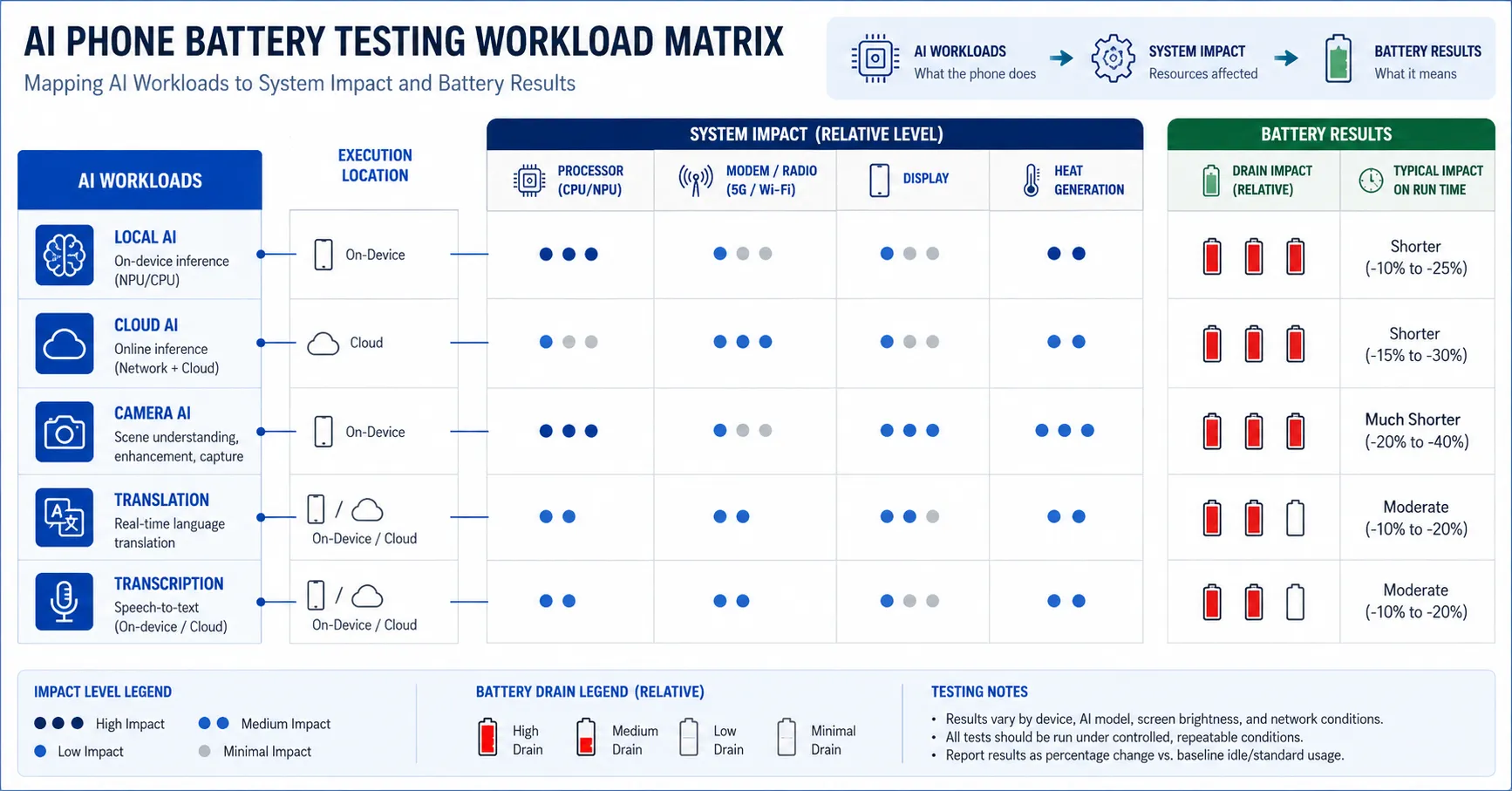
“AI use” is not one workload. A local transcription task, cloud image generation, camera scene analysis and background assistant can activate different hardware and radios. Record the feature name, application, model version, execution location, input and expected output.
Confirm whether processing occurs locally, remotely or in both places. A cloud task may place more demand on the modem and display than on the neural processor. Network delay can extend the active period and change total energy.
Freeze account status, subscription, language, privacy settings and feature availability. A task that silently falls back to the cloud is not comparable with a local run.
Build an AI Workload Matrix
| Workload | Controlled input | Evidence |
|---|---|---|
| Transcription | Same audio file, language and duration | Time, energy, accuracy and temperature |
| Translation | Same text or audio and language pair | Latency, network use and battery change |
| Image generation | Same prompt, size and model | Completion time, data and heat |
| Photo editing | Same image and edit instruction | Processor time and energy |
| Camera AI | Same scene, resolution and duration | Frame behavior, heat and percentage |
| Background assistant | Same notifications and observation period | Standby drain and wake events |
Establish a Non-AI Baseline
Test standby, local video and controlled browsing before AI workloads. Record the exact software build, brightness, refresh rate, radio settings, application set and ambient temperature.
Use an original known-good battery and production-representative replacement samples. Stabilize the device after setup or update so indexing and synchronization do not contaminate the comparison.
Keep one unmodified control device. It helps determine whether a later application or operating-system update changed the workload.
Characterize the Battery
Record voltage, approved resistance measurement, measured capacity, Watt-hours, dimensions, batch and installation. Capacity and peak-power capability are different; AI workloads can expose short demand bursts not visible in a gentle discharge.
Run controlled capacity tests with documented equipment, temperature, charging, rest, load and cutoff. Use ESC’s battery capacity testing guidance as a general framework.
Do not infer performance from printed mAh alone. Voltage drop, protection behavior, connector resistance and temperature can influence the phone.
Control Local and Cloud Execution
For local tests, disable unnecessary network activity and verify that the task still completes. For cloud tests, use a controlled Wi-Fi or cellular environment and record signal quality, data transfer and server response time.
Repeat mixed tests because routing may change. Capture application logs or network evidence where permitted. If execution location cannot be confirmed, classify the result as an end-to-end user workflow rather than a processor-efficiency measurement.
Never compare local and cloud results as if they measure the same component.
Measure Energy Per Completed Task
Runtime alone can reward a slow device. Record tasks completed, completion time and energy consumed. For transcription, use minutes processed; for generation, use completed outputs; for photo editing, use identical operations.
Repeat each task enough times to understand variation. Discard a run only under a predefined rule, such as network failure, and retain the reason.
Report median, spread and outliers rather than selecting the best run.
Capture Peak Power and Voltage Behavior
AI processing may alternate between idle and short high-demand periods. Record power or current at sufficient resolution where the test setup permits, together with battery state and temperature.
Test at high, medium and lower states of charge. A weak pack may pass near full charge and show instability later. Record performance reduction, restart, shutdown and recovery.
Do not bypass protection or exceed the approved operating range to create a dramatic result.
Map Temperature
Measure battery, processor-region and external surface temperature using repeatable locations. Control case, airflow and ambient conditions.
Separate normal device thermal management from battery abnormality. Compare original and replacement batteries in matched devices and workloads. Record if the feature slows, stops or moves processing to the cloud.
Stop and quarantine any swollen, leaking, damaged or uncontrollably hot sample.
Control the Display and Camera
Many AI features keep the display and camera active. Fix brightness, refresh behavior, camera resolution, frame rate, stabilization and scene lighting.
Use recorded or mechanically repeatable inputs where possible. A changing scene makes camera AI difficult to compare. Separate camera preview, capture and post-processing stages.
Record screen-on duration so display energy is not mistaken for model-processing energy.
Test Background AI and Standby
Some features organize content, summarize notifications or prepare suggestions in the background. Create a defined dataset and observation period. Record wake events, network activity and percentage change.
Compare immediately after setup with a stabilized state. Background analysis may be temporary. Do not turn one first-day result into a permanent runtime claim.
Use airplane mode, Wi-Fi and cellular scenarios to separate radio effects.
Evaluate Charging During AI Use
Run selected tasks while charging because simultaneous processing and charging can increase heat. Use a known-good charger and cable and control starting state of charge.
Record input power, battery percentage, temperature, task completion and any charging reduction. A slower charge may be intentional thermal management rather than battery failure.
Compare with a matched non-AI charging session.
Review Software Updates
Model, application and operating-system updates can change energy use. Record exact versions and repeat a critical subset after updates.
Do not overwrite earlier results. A history shows whether a battery complaint follows the software, device or batch.
ESC’s replacement battery drain guide can support broader fault isolation.
Approve Production Samples
Use pilot samples made with the intended cell, protection board, connector, flex and process. Compare capacity, resistance, thermal and workload distributions.
Require change approval for cell, protection, connector, firmware-related configuration and production location. A printed capacity match does not prove identical transient behavior.
Link incoming inspection and field returns to battery batch and software build.
Avoid Common Errors
- Calling every camera feature an AI benchmark.
- Mixing local and cloud runs.
- Ignoring network latency.
- Reporting percentage without completed work.
- Testing only at full charge.
- Ignoring display and camera power.
- Comparing different software builds.
- Using one sample.
- Equating capacity with peak power.
- Publishing universal temperature limits.
Design Repeatability and Sample Size
Run repeated trials across multiple devices and batteries. Separate variation caused by server response, wireless conditions and application randomness from variation caused by the battery.
Define sample size from product risk, expected volume, workload severity and measurement variability. One premium demonstration unit cannot approve a production lot.
Randomize task order where heat or state of charge may bias later stages. Alternatively, reset and condition the device between stages using a documented procedure.
Normalize Results Without Hiding Real Differences
Report absolute energy, task time, work completed and battery percentage. If results are normalized by battery capacity, retain the original values so reviewers can see the physical difference.
Do not normalize away performance throttling. A device that uses less energy because it failed to complete the intended workload has not passed the same task.
Explain measurement uncertainty and rounding. Small differences may not be commercially or statistically meaningful.
Validate User-Visible Quality
Energy efficiency is not the only outcome. Record transcription accuracy, translation completion, generated-output success, camera frame behavior and application errors.
A replacement battery should not be credited for long runtime if voltage or thermal behavior causes slower processing, failed tasks or reduced feature availability. Compare useful outputs under matched conditions.
Where output quality is nondeterministic, use a defined acceptance rubric or focus on completion and resource use rather than subjective preference.
Investigate Abnormal Results
When a sample drains faster, repeat it in another verified device and test a known-good battery in the complaint device. Inspect installation, connector, flex and temperature.
Review whether the task moved between local and cloud execution, whether the network changed, and whether the application updated. Preserve logs and screenshots before resetting the phone.
Code the outcome as battery, device, software, network, workload definition, installation or unable to reproduce. Do not use “AI issue” as a root-cause category.
Connect Laboratory Results to Warranty Triage
Create complaint questions that capture the AI feature, application version, input type, network, charging state, temperature and time. A generic “battery drains during AI” ticket is difficult to reproduce.
Compare field cases with the laboratory workload library. Add a new scenario only when it represents a meaningful and repeatable pattern.
Aggregate results by battery batch, phone model and software. This prevents a global battery recall based on a cloud-service or application-specific event.
Protect Data and Test Accounts
AI tasks may send text, audio, photographs or device data to external services. Use controlled non-customer datasets and approved test accounts. Do not upload customer records merely to reproduce a warranty complaint.
Document retention and deletion for prompts, outputs, logs and recordings. Limit access to personnel who need the evidence.
When regional routing or privacy settings alter execution, treat those configurations as separate test conditions.
Document device storage, free memory, thermal history and whether the model was downloaded immediately before the run. Model preparation can consume energy that should not be confused with the repeated inference task. Conversely, excluding preparation may understate the first-use experience. Report both when the customer workflow includes initial download or compilation.
Set a defined recovery period between heavy tasks. Confirm that the device returns to the approved temperature window and that background processing has ended. Starting the next run while the phone remains hot can create order-dependent results and inappropriate throttling.
Use a phone battery thermal validation review to connect surface temperature with battery-region measurements, completed work and charging state. Temperature alone does not identify the heat source, so compare battery, processor, modem and environmental evidence.
Frequently Asked Questions
Does on-device AI always consume less energy?
No. It avoids some radio and server interaction but may use local processors intensively. Measure the complete task.
What is the best AI battery benchmark?
There is no universal benchmark. Select repeatable tasks that represent the target users and record work completed.
Can a video test predict AI runtime?
No. Video provides a baseline but may not reproduce burst power, camera, memory or network behavior.
Why test at low state of charge?
Voltage and peak-power limitations may become more visible near the lower operating range.
Should every software update trigger full retesting?
Use risk-based regression: repeat critical workloads, then expand if behavior changes.
Test Useful Work, Not AI Labels
Reliable AI phone battery testing measures energy, performance and heat for defined tasks under controlled local, cloud and mixed execution. It connects the result to the battery batch, device and software build.
Send ESC your target devices, AI workflows, sample quantity and acceptance needs. ESC can support model-level sample and batch planning. Final limits require verified project data.