A battery complaint reported immediately after a software update may be related to indexing, application compatibility, network activity, changed charging settings, device hardware, installation quality or the battery itself. The timing is important evidence, but it is not a root-cause conclusion.
A professional process for phone battery complaints after software updates should preserve the device state, identify the exact build, allow an approved stabilization period and compare controlled results with known-good devices and batteries. This prevents premature warranty rejection and prevents software-related demand from being recorded as a supplier batch defect.
This SOP is intended for repair chains, refurbishment facilities, mobile-parts wholesalers, battery brands and private-label buyers. Every organization should adapt the sampling, test duration and acceptance limits to the actual model, software, battery specification and commercial risk.
Why Post-Update Complaints Are Difficult to Diagnose
An operating-system update can change background services, charging controls, modem behavior, diagnostics, application permissions and battery estimates. The device may also perform temporary work such as indexing files, analyzing photographs, rebuilding caches, downloading applications and synchronizing cloud data.
At the same time, the battery may already have reduced capacity, high impedance, poor connector contact or installation damage. A customer may notice the problem only because the update prompted closer observation. The investigation must therefore test competing explanations instead of selecting the most visible event.
Common symptoms include faster percentage decline, overnight drain, unusual warmth, slow charging, charging pauses, percentage jumps, restart changes and shutdown above the expected lower state of charge. These symptoms overlap across software, battery and device causes.
Open a Controlled Incident Record
Do not begin by resetting or restoring the device. First preserve the state in which the complaint occurred. Create a case number and record:
- phone model, region, hardware revision and serial reference;
- battery model, supplier, batch, installation date and repair order;
- software version, build number, update channel and update date;
- whether the update was installed over the air or through a computer;
- complaint start time and symptom description;
- charger, cable, network, applications and environmental conditions;
- Battery Health, service history and available diagnostic information;
- screenshots, photographs and raw measurements;
- previous repairs, liquid exposure, drops and charging incidents.
Ask the customer what changed besides the operating system. A new application, transferred data, weak-signal location or damaged cable may be more important than the update itself.
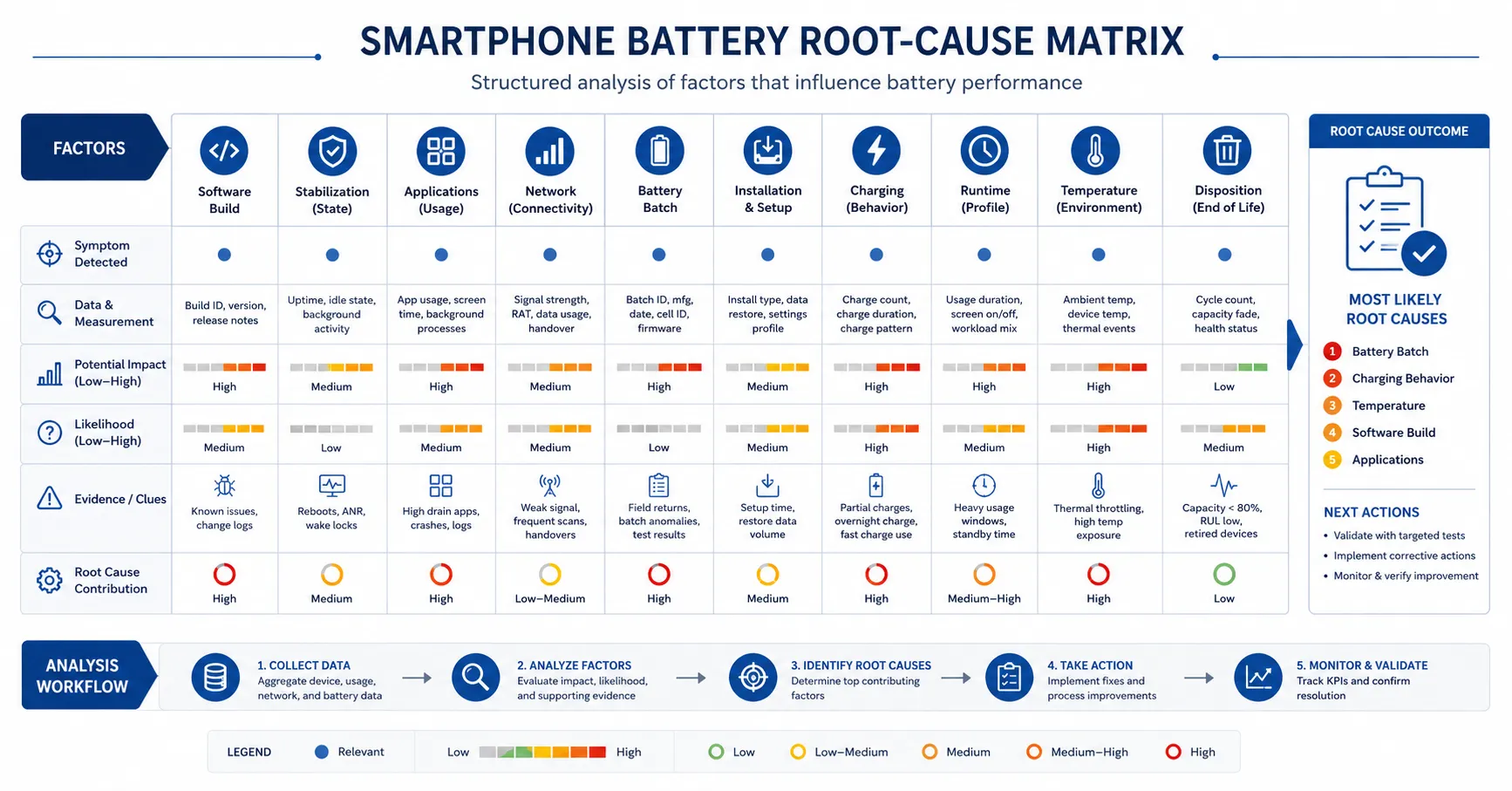
Build a Root-Cause Test Matrix
| Cause family | Evidence to collect | Control comparison |
|---|---|---|
| Software | Exact build, update path, background tasks and settings | Same build on a known-good device |
| Applications | Usage report, versions, permissions and background activity | Controlled clean application set |
| Network | Signal quality, radio mode, Wi-Fi and data activity | Stable controlled network |
| Battery | Capacity, voltage, resistance, temperature and batch | Known-good battery under the same method |
| Installation | Connector, flex, adhesive, damage and work record | Verified installation by a trained operator |
| Device | Charging port, board, sensors and physical condition | Known-good device of the same model |
| Measurement | Starting state, duration, settings and equipment | Frozen laboratory procedure |
Define a Stabilization Period
A newly updated phone may not represent steady-state consumption. Define an observation period based on the update type, device workload and service policy. During this period, record whether indexing, downloads, cloud synchronization or application updates remain active.
Do not promise that every update will stabilize within one fixed number of hours. Some devices contain more data or use different services. Instead, define observable exit conditions: background activity has returned to baseline, the phone has completed application updates, temperature is normal at idle and repeated standby measurements are consistent.
If the complaint involves dangerous heat, swelling, odor, leakage or physical damage, do not wait for stabilization. Stop using the device and follow the approved safety and quarantine process.
Record Battery Usage Before Changing Settings
Capture the operating system’s battery-usage view, active applications, screen-on time, background time and charging history where available. These screens provide clues, but they are not independent laboratory measurements.
A high application percentage may mean that the application dominated a small amount of total use, not that it consumed an abnormal absolute amount. Compare the device-reported view with elapsed time, percentage change, temperature and controlled workload evidence.
Save screenshots before clearing applications, signing out, resetting settings or restoring the phone. Destructive troubleshooting can remove the evidence needed for a warranty decision.
Check Charging Settings and Learned Behavior
Software updates can expose new charge limits, optimization features or recommendations. Confirm the selected limit, optimized charging status, clean-energy settings where applicable and whether the device is intentionally pausing charging.
Use a known-good charger and cable. Record input voltage, current, power, battery percentage, temperature and time. Compare the behavior before and after restart and on another device running the same build.
One charging pause does not prove a defective battery. It may reflect temperature, software optimization, connector instability or charger negotiation. Repeat the test under a controlled method before coding the failure.
Run a Controlled Standby Test
Standby complaints are common because customers notice overnight percentage loss. Begin at a defined state of charge, close or configure applications consistently, control network conditions and record ambient temperature.
Test several states separately: airplane mode, stable Wi-Fi, cellular service and the customer’s reported configuration. This can reveal whether radio searching or synchronization dominates the result.
Use the same duration and starting conditions for the complaint device, a known-good device and a battery control. Avoid judging very small percentage changes from a short test because displayed values are rounded and state-of-charge estimates can move after rest.
Run Controlled Workload Tests
Create repeatable stages for local video, streaming, browsing, camera, voice call and a sustained processing load. Freeze brightness, refresh settings, volume, application versions, network and test duration.
Record percentage and temperature at fixed intervals. A curve is more useful than one final runtime value because it can reveal jumps, plateaus, rapid early decline or abnormal heat.
Separate local video from streaming so network effects are visible. Use controlled browsing content rather than public pages that change advertisements and scripts during the comparison.
Verify Capacity and Peak-Power Delivery
A device test should be supported by battery measurements. Record open-circuit voltage, approved resistance measurement and controlled capacity. Document equipment, calibration, temperature, charge profile, rest time, discharge load and cutoff.
Capacity and peak power are different. A battery may deliver acceptable energy under a gentle bench discharge yet show excessive voltage drop under camera, gaming or radio demand. Test realistic high-load behavior at several states of charge.
ESC’s phone battery capacity testing guide provides general method principles. Final limits must be approved for the specific battery and phone.
Inspect the Installation
Review the repair record and inspect the connector, flex, insulation, adhesive and enclosure. Look for contamination, bent contacts, damaged cables, missing fasteners, compressed cells and pressure against the display.
Intermittent contact can appear as charging interruption, percentage change or shutdown. Repeat movement or enclosure-pressure testing only under a safe approved method; do not bend or press the battery to reproduce the event.
If reinstalling the battery changes the result, record the original condition and corrective action. Do not erase the installation cause by reporting only the final pass.
Compare With a Known-Good Device and Battery
The strongest diagnostic design uses two independent controls: the complaint battery in a verified device where safe and authorized, and a known-good battery in the complaint device. This cross-check can separate battery and handset effects.
Use matching phone models, hardware revisions and software builds. A different device family may have different display, modem and thermal behavior.
Never move a swollen, leaking, damaged or electrically unstable battery between devices. Safety overrides diagnostic completeness.
Classify the Root Cause
Use standardized codes rather than free-form opinions:
- temporary post-update background activity;
- application or configuration issue;
- network or signal condition;
- charging accessory or port;
- battery capacity or resistance;
- battery communication or protection;
- installation defect;
- device hardware defect;
- software defect reproduced on controls;
- customer-use condition;
- unable to reproduce;
- insufficient evidence.
“Unable to reproduce” is not the same as “customer error.” Record the exact test scope and evidence limitations.
Make a Fair Warranty Decision
The warranty decision should follow the verified cause, applicable consumer law and written commercial terms. Do not reject a claim merely because it followed an update. Do not approve a supplier batch claim merely because several customers mentioned the same update.
Where evidence is incomplete, define a conditional action such as observation, software monitoring, accessory replacement, reinstallation or battery exchange. Preserve the returned battery for analysis when batch risk is suspected.
Warranty depends on the specific product and agreement. ESC should not publish one universal warranty period or promise for every battery.
Use Complaint Trends to Detect Batch Risk
Aggregate cases by phone model, software build, battery model, supplier batch, production date, repair centre, technician, region and symptom. Compare complaint rates before and after the update.
If complaints occur across different battery batches but only on one software build, software or device interaction deserves priority. If one battery batch shows the same failure across multiple builds and devices, quarantine and supplier investigation may be justified.
Review raw counts together with installed population. Ten complaints from a very large installed base may represent a different risk than five complaints from a small pilot lot.
Connect the SOP to Incoming Inspection
Feed confirmed battery failures back into incoming inspection. Update sampling or test coverage when a meaningful pattern appears. ESC’s mobile phone battery incoming inspection guide can support batch identity, quarantine and disposition controls.
Do not tighten specifications from one unverified complaint. Confirm the mechanism, measurement repeatability and relationship with the approved design.
Retain golden samples and incoming data so later returns can be compared with the original batch distribution.
Prepare for the Next Software Release
Use the same controlled subset as a software update battery testing gate before support teams change public troubleshooting advice.
Maintain dedicated non-production devices for selected models. Before a major update, record charging, standby, runtime, temperature and repair-status baselines. Test replacement battery configurations on the new build before approving public compatibility statements.
Keep results by exact build instead of overwriting previous data. A history shows when behavior changed and whether a later maintenance release resolved it.
Use wording such as “observed on build X under the documented method” instead of “compatible with all future updates.”
Frequently Asked Questions
Does an update cause battery drain immediately after installation?
It can increase temporary background work, but the cause must be verified. Applications, network, battery condition, installation and hardware may contribute.
How long should a phone stabilize?
Use observable exit conditions instead of one universal duration. Background activity, temperature and repeated standby results should return to a stable baseline.
Should the phone be factory-reset first?
No. Preserve screenshots and configuration evidence before destructive troubleshooting. Reset only when authorized and when earlier steps do not resolve the case.
Can a normal capacity test rule out the battery?
No. Peak-power delivery, resistance, communication, installation and temperature can still affect device behavior.
When should a battery lot be quarantined?
Quarantine when repeatable evidence links an abnormal pattern to the lot or when physical safety indicators appear. Define authority and release requirements in advance.
Replace Timing Assumptions With Evidence
A repeatable SOP for phone battery complaints after software updates protects customers and suppliers. It preserves evidence, controls stabilization, reproduces symptoms and connects warranty decisions to measurable causes.
Send ESC your target phone models, complaint codes, battery batches and validation requirements. ESC can support model-level samples and batch-record preparation. Final limits, compatibility and warranty decisions must be approved for the specific product and agreement.
External Source References
- Apple Support — iPhone Battery and Performance
- Apple Support — About Charge Limit and Optimized Battery Charging