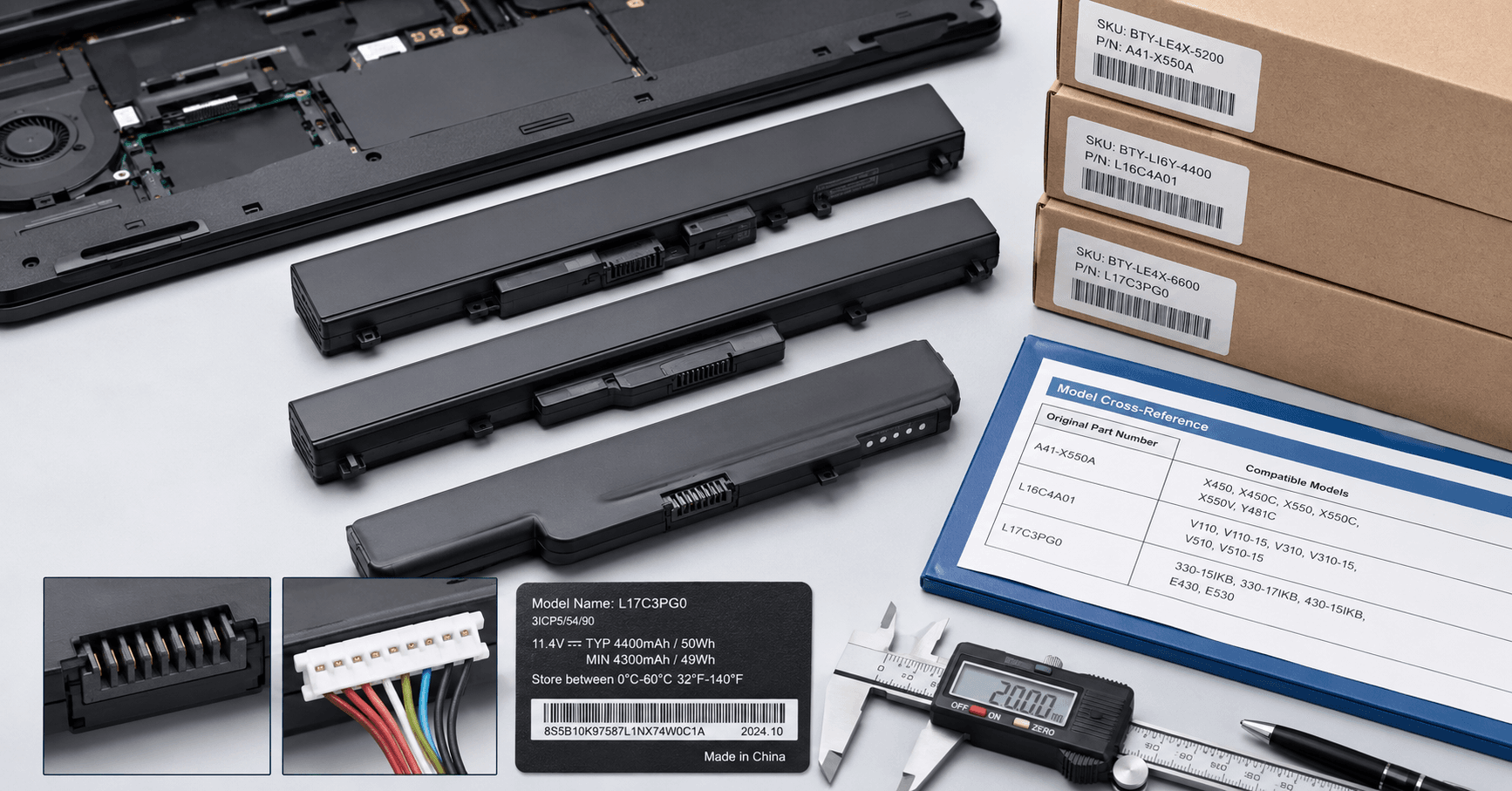
Laptop battery part number matching should use more than the laptop’s retail name. Repair chains, refurbishment facilities, wholesalers, and parts distributors should verify the device model, original battery reference, physical structure, connector, and electrical specification before approving a replacement battery.
The safest purchasing record connects all of these identifiers to one buyer SKU. If any critical field remains uncertain, the battery should be treated as a candidate for sample validation rather than a confirmed compatible product.
Why a Laptop Model Name Is Not Enough
A laptop family may contain several chassis, regional versions, production revisions, and battery configurations. Two devices sold under a similar commercial name may use batteries with different shapes, connectors, cable positions, mounting points, voltages, or capacities.
The reverse can also occur: one battery reference may appear in several related devices. This makes part-number cross-referencing useful, but a cross-reference should not be accepted without confirming the physical and electrical configuration.
For B2B buyers, an incorrect match creates costs beyond the battery price:
- Technicians spend time opening a device before discovering the mismatch.
- Refurbishment lines stop while staff search for another part.
- Wholesalers receive returns from downstream repair shops.
- E-commerce sellers face compatibility complaints.
- Private label brands may need to replace mislabeled stock.
- Slow-moving incorrect inventory consumes warehouse space and cash.
A professional matching process should therefore answer two separate questions:
- Does the battery correspond to the intended device?
- Is the quoted product the same configuration that was sampled and approved?
Build a Four-Part Battery Matching Record
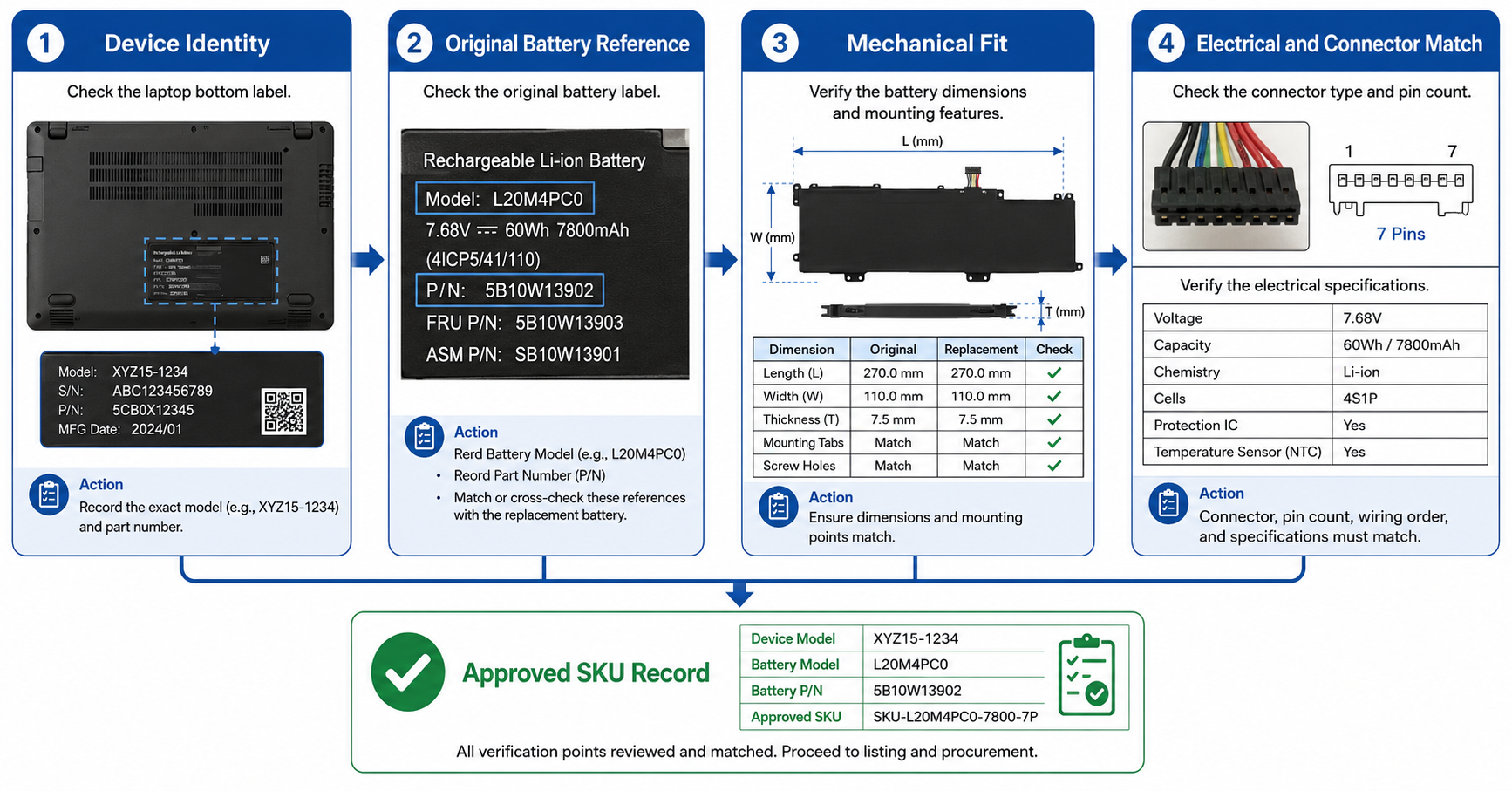
A controlled laptop battery part number matching record should contain four groups of information.
1. Device identity
Record:
- Laptop manufacturer
- Full device model
- Model number from the bottom label
- Product, machine, or configuration code where available
- Regional or production suffix
- Chassis or motherboard reference when relevant
- Photographs of the device label
- Photograph of the opened battery compartment
Do not rely only on a name used in an online listing. A shortened retail name may omit the code needed to distinguish different versions.
2. Original battery reference
Record the information printed on the battery being replaced:
- Battery part number
- Alternative part or assembly number
- Regulatory or model code
- Nominal voltage
- Labeled capacity
- Watt-hour value where shown
- Connector or cable reference
- Label photograph
- Battery revision or date code when relevant
The complete label photograph is more useful than a manually typed number because it preserves the surrounding specifications and formatting.
If the original battery is unavailable, state this clearly in the RFQ. The matching decision will then depend more heavily on device information, internal photographs, measurements, and sample testing.
3. Mechanical configuration
Record:
- Battery length, width, and thickness
- Overall shape
- Number and position of battery sections
- Mounting-hole or screw positions
- Locating tabs
- Cable length
- Cable exit direction
- Connector location
- Space around the battery compartment
- Adhesive, frame, or bracket requirements
A battery can have a matching voltage and a familiar part number while still being unsuitable because the housing, cable, or mounting configuration differs.
4. Electrical and connector configuration
Confirm:
- Nominal voltage
- Charge-related specification where applicable
- Labeled capacity
- Watt-hour value where available
- Connector type
- Pin count
- Connector orientation
- Cable arrangement
- Communication or battery-management requirements
- Intended laptop platform
Matching voltage alone does not prove compatibility. The connector, pin arrangement, communication behavior, physical installation, and battery-system design must also be suitable.
Battery Matching Matrix
| Verification field | Buyer evidence | Supplier confirmation | Approval status |
|---|---|---|---|
| Laptop model | Device label and full model code | Listed supported model | Confirmed / Pending |
| Original battery reference | Battery label photograph | Cross-referenced part number | Confirmed / Pending |
| Voltage configuration | Original label or approved specification | Quoted battery specification | Confirmed / Pending |
| Battery shape | Internal photograph and outline | Product photograph or drawing | Confirmed / Pending |
| Dimensions | Buyer or original-battery measurements | Supplier specification | Confirmed / Pending |
| Connector | Close-up photograph and pin count | Connector photograph and description | Confirmed / Pending |
| Cable position | Internal installation photograph | Quoted product structure | Confirmed / Pending |
| Sample result | Installation and function record | Sample or revision code | Approved / Rejected |
The matrix should use controlled revisions. If the battery, connector, cable, protection system, label, or housing changes after approval, the supplier should identify the change before production.
Use a Step-by-Step Matching Process
Step 1: Collect evidence from the device
Ask the technician, customer, or refurbishment team for the complete laptop model and clear photographs. When possible, obtain photographs of:
- The laptop bottom label
- The original battery label
- The complete battery
- The connector
- The battery compartment
- The motherboard-side connection
- Mounting points and cable route
Avoid accepting a cropped photograph that shows only one number without its context.
Step 2: Separate identifiers by type
Do not place every number into one uncontrolled notes field. Identify whether each number belongs to:
- The laptop
- The original battery
- A battery assembly
- A supplier product
- A warehouse SKU
- A packaging label
- A customer reference
This prevents a laptop model number from being mistaken for a battery part number.
Step 3: Cross-reference the candidate battery
Compare the original reference with the supplier’s compatibility list. If several battery references point to the same candidate, confirm whether they share the same voltage, shape, connector, and installation structure.
Treat a cross-reference list as a starting point, not final proof. Lists can contain outdated, incomplete, or overly broad mappings.
Step 4: Compare physical and electrical fields
Check the candidate against the matching matrix. Critical differences should be resolved before ordering.
Examples include:
- Different voltage configuration
- Connector on the opposite side
- Shorter cable
- Different mounting-hole positions
- Battery section shaped for another chassis
- Thickness that interferes with the housing
- Different pin arrangement
- Unclear communication compatibility
If an important detail cannot be confirmed, request a sample or additional evidence.
Step 5: Assign a matching-confidence status
A practical status system can be:
- Confirmed: device, original reference, structure, connector, and electrical fields agree.
- Conditional: most fields agree, but sample installation is still required.
- Pending: important information is missing.
- Conflicting: two sources provide different compatibility information.
- Rejected: a critical mismatch has been identified.
Only confirmed or successfully validated conditional matches should enter an approved purchasing list.
Recognize Common Matching Traps
Similar laptop names
Marketing names often describe a family rather than one exact hardware configuration. Always look for the full model or machine code.
Multiple original battery references
A device family may use more than one battery reference. Determine whether the references are interchangeable or represent different configurations.
One battery listed for too many devices
A long compatibility list can be useful, but it also increases the risk of an overly broad claim. Verify the buyer’s actual device rather than assuming every listed model has been tested.
Matching shape but different connector
The battery may fit the compartment while using another connector, cable, or pin arrangement.
Matching connector but different structure
A connector can look correct while the battery case, cable route, mounting points, or dimensions prevent installation.
Capacity used as the main identifier
Capacity is not a unique product identity. Different batteries can show similar mAh or Wh values while using different shapes, voltages, connectors, or battery-management systems.
Capacity claims must be verified for the specific battery model and test method. A larger printed capacity should not override compatibility checks.
Product photos reused across several listings
Generic catalog photographs may not show the supplied configuration. Request photographs, drawings, or samples connected to the quoted supplier SKU.
Control Mixed-Model Wholesale Orders
Mixed-model orders need stronger data control because similar batteries can be confused during purchasing, production, packing, receiving, and warehouse picking.
Each approved battery should receive a unique buyer SKU linked to:
- Approved laptop models
- Original battery references
- Supplier SKU
- Product photographs
- Electrical specification
- Dimensions
- Connector photographs
- Packaging label
- Sample revision
- Approval date
- Current status
Do not use one buyer SKU for batteries that require different connectors, voltages, structures, or installation instructions.
Recommended SKU Record
| Field | Example content type |
|---|---|
| Buyer SKU | Unique internal code |
| Supplier SKU | Quoted factory reference |
| Device family | Controlled product family |
| Approved device models | Full verified model list |
| Original battery references | Verified cross-reference list |
| Electrical specification | Approved voltage and labeled capacity |
| Mechanical specification | Dimensions and structure |
| Connector specification | Type, pins, direction, and cable |
| Packaging revision | Approved label and box version |
| Sample revision | Tested sample code or photograph |
| Approval status | Confirmed, Conditional, Pending, Conflicting, or Rejected |
This record helps purchasing, warehouse, sales, and after-sales teams use the same product identity.
Validate Samples Before Bulk Approval
Sample testing should confirm that the quoted battery and the matching record describe the same product.
Identity inspection
Check:
- Supplier SKU
- Battery label
- Part reference
- Voltage
- Labeled capacity
- Connector
- Cable
- Dimensions
- Surface and housing
- Packaging
Installation inspection
Use a verified compatible laptop and check:
- Battery placement
- Mounting alignment
- Connector fit
- Cable routing
- Housing closure
- Unwanted mechanical pressure
- Device power-on
- Charging behavior
- Battery recognition
- Basic discharge behavior
Testing one previously repaired laptop may not prove repeatable fit. Where practical, compare more than one device and more than one sample.
Record the result
The approval record should identify:
- Laptop model
- Original battery reference
- Supplier battery SKU
- Sample code
- Test device
- Installation result
- Functional result
- Any warning or limitation
- Photographs
- Test date
- Approver
A verbal statement such as “sample works” is too weak for controlling repeat orders.
Write a Better Laptop Battery RFQ
A laptop battery RFQ should include:
- Buyer company and channel
- Target market
- Complete laptop model list
- Original battery part numbers
- Device and battery photographs
- Required quantity by model
- Forecast demand
- Electrical specification
- Dimensions and connector details
- Packaging requirements
- Barcode and label requirements
- Required documents
- Sample quantity
- Sample approval process
- Inspection requirements
- Requested commercial terms
MOQ depends on the selected model and customization scope. Lead time depends on the model, order quantity, packaging, and customization. Warranty also depends on the specific product and agreement.
Ask the supplier to confirm these conditions for the actual SKU list instead of applying one general answer to every battery.
Match the Process to the Buyer
Repair chains
Repair chains should prioritize rapid identification, common-model availability, installation notes, and consistent SKU naming across stores.
Refurbishment facilities
Refurbishers should connect battery SKUs with laptop grading, production volume, installation results, and final-device testing. High-volume models need particularly clear approval records.
Wholesalers and distributors
Wholesalers should separate confirmed repeat-stock models from conditional or customer-confirmed models. A long catalog is not useful if the warehouse cannot distinguish similar batteries accurately.
E-commerce sellers
Online sellers need precise compatibility lists, product photographs, packaging labels, and clear limitations. Avoid implying universal compatibility.
Private label brands
Private label buyers should control product identity, artwork, barcodes, compatibility wording, packaging revisions, warranty wording, and component changes.
Pre-Order Matching Checklist
Before approving a bulk order, confirm that:
- The full laptop model is recorded.
- The original battery label has been reviewed where available.
- Device and battery part numbers are stored separately.
- Voltage, capacity, and Wh information have been cross-checked.
- Battery dimensions and shape match the device.
- Mounting points and cable routing are suitable.
- Connector type, pin count, and orientation have been confirmed.
- Generic product photos are not the only matching evidence.
- A supplier SKU is linked to the approved configuration.
- Uncertain matches are marked Conditional or Pending.
- Samples have been installed in verified compatible devices.
- Sample results and photographs are recorded.
- Packaging uses the correct buyer SKU and compatibility information.
- Component or structural changes require notification.
- Bulk inspection refers to the approved sample and specification.
Frequently Asked Questions
Is the original battery part number enough to order a replacement?
It is an important reference, but buyers should also confirm voltage, physical structure, connector, cable position, and intended device. If the original battery is unavailable, collect complete device information and internal photographs.
Can two batteries with the same voltage and capacity be interchangeable?
Not automatically. They may have different dimensions, connectors, pin arrangements, cable positions, mounting points, or battery-management requirements.
What if the supplier and buyer compatibility lists conflict?
Mark the match as Conflicting and do not present it as confirmed. Compare the underlying device, battery, mechanical, connector, and electrical evidence. Request a sample when the conflict cannot be resolved from documentation.
How should wholesalers manage one battery that fits several laptops?
Use one controlled battery SKU linked to a verified compatibility list. Record how each model was confirmed and avoid adding devices based only on unverified catalog claims.
When is sample testing necessary?
Sample testing is especially useful for new suppliers, new models, incomplete original-battery information, conflicting cross-references, structural revisions, or large repeat-order programs.
Does a successful installation prove long-term battery performance?
No. Installation confirms fit and basic function under the recorded conditions. Capacity, cycle life, storage behavior, and long-term consistency require separate evidence and defined test methods.
Build a Controlled Compatibility Database
Laptop battery part number matching is a data-control process as much as a product-selection task. Buyers need to connect the laptop, original battery, supplier product, approved sample, and warehouse SKU through one traceable record.
This process reduces wrong-fit inventory, improves RFQs, gives technicians clearer information, and provides a stable reference for repeat orders.
Send ESC your laptop model list, original battery references, label photographs, connector images, target quantity, market, and packaging requirements. ESC can review the available information and discuss a suitable model-confirmation and sampling plan.
Internal Link Suggestions
- Laptop Battery Supplier for Repair Shops and Refurbishment Facilities → Related laptop battery sourcing pillar article
- Explore Tablet and Laptop Replacement Batteries → Product category
- Tablet Replacement Battery Sourcing and Sample Approval → Related matching and sample-control workflow
- Learn About ESC → General company information; do not reuse unverified numerical claims