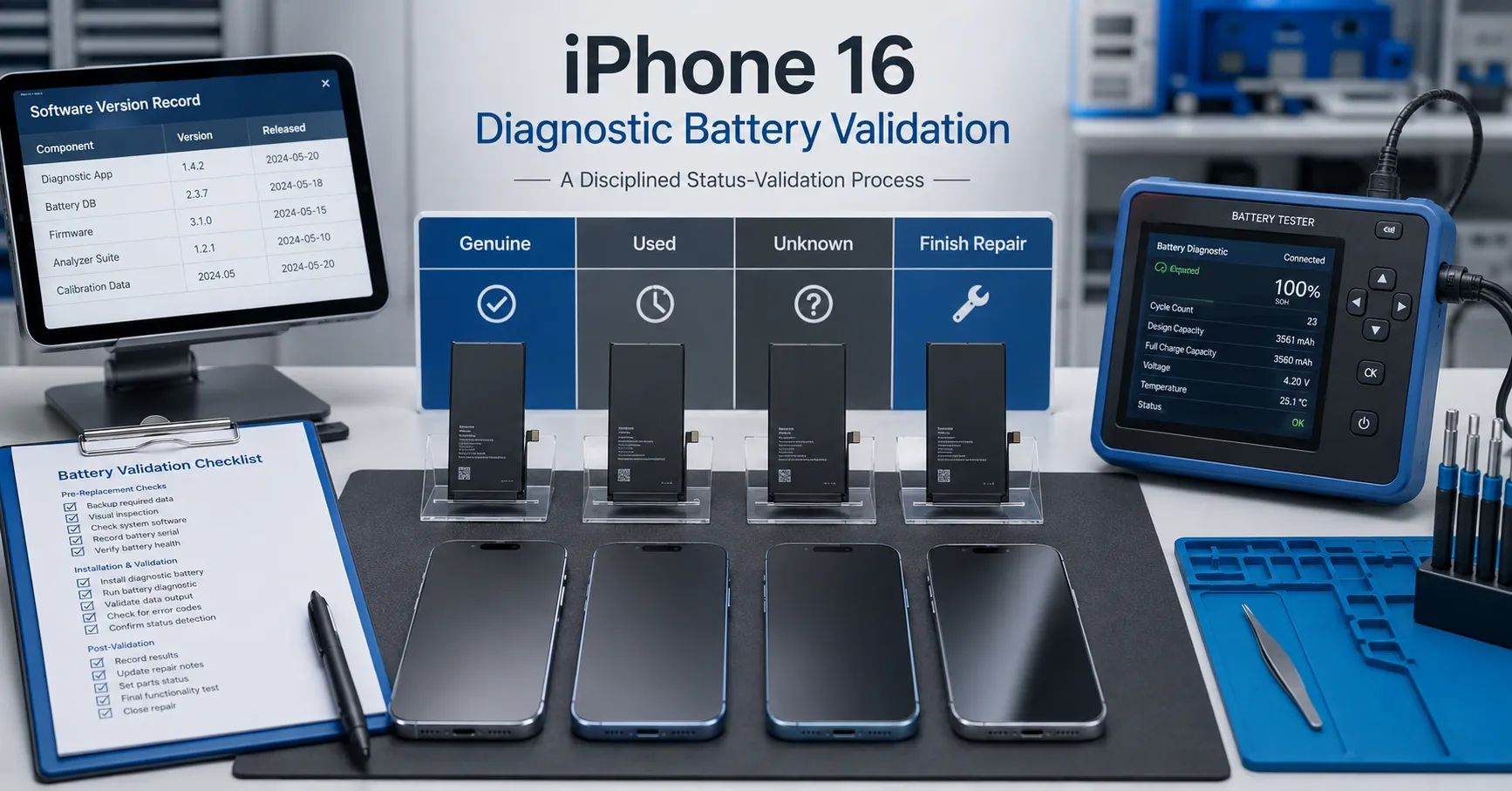
The repair market often uses “diagnostic battery” to describe a replacement solution intended to support cleaner battery information, post-repair diagnostics, or system recognition. Apple does not use that phrase as an official battery category, so buyers must convert the supplier’s description into functions that can be tested.
An iPhone 16 diagnostic battery should not be approved because one demonstration phone displayed Genuine after installation. A professional buyer should verify the exact battery source, iPhone 16 model, iOS version, repair process, Parts and Service History status, health information, charging, capacity, temperature, and repeatability across samples.
Recent market observations may be valuable, but they should be described accurately: some solutions have reportedly displayed Genuine rather than Used under particular conditions. That is not evidence that every diagnostic battery or every iPhone 16 will show the same status on all current and future iOS builds.
Define “Diagnostic Battery” Before Requesting Samples
Ask the supplier which functions are included:
- Battery Health display;
- maximum-capacity information;
- cycle-count or battery-date information;
- system diagnostics;
- Parts and Service History behavior;
- Repair Assistant support;
- charging and percentage communication;
- warning-message handling;
- compatibility after update, restart, or restore.
Require written definitions. “Supports diagnosis,” “shows health,” “no warning,” and “shows Genuine” are different claims. One should not be substituted for another.
Understand Apple’s Official Status Definitions
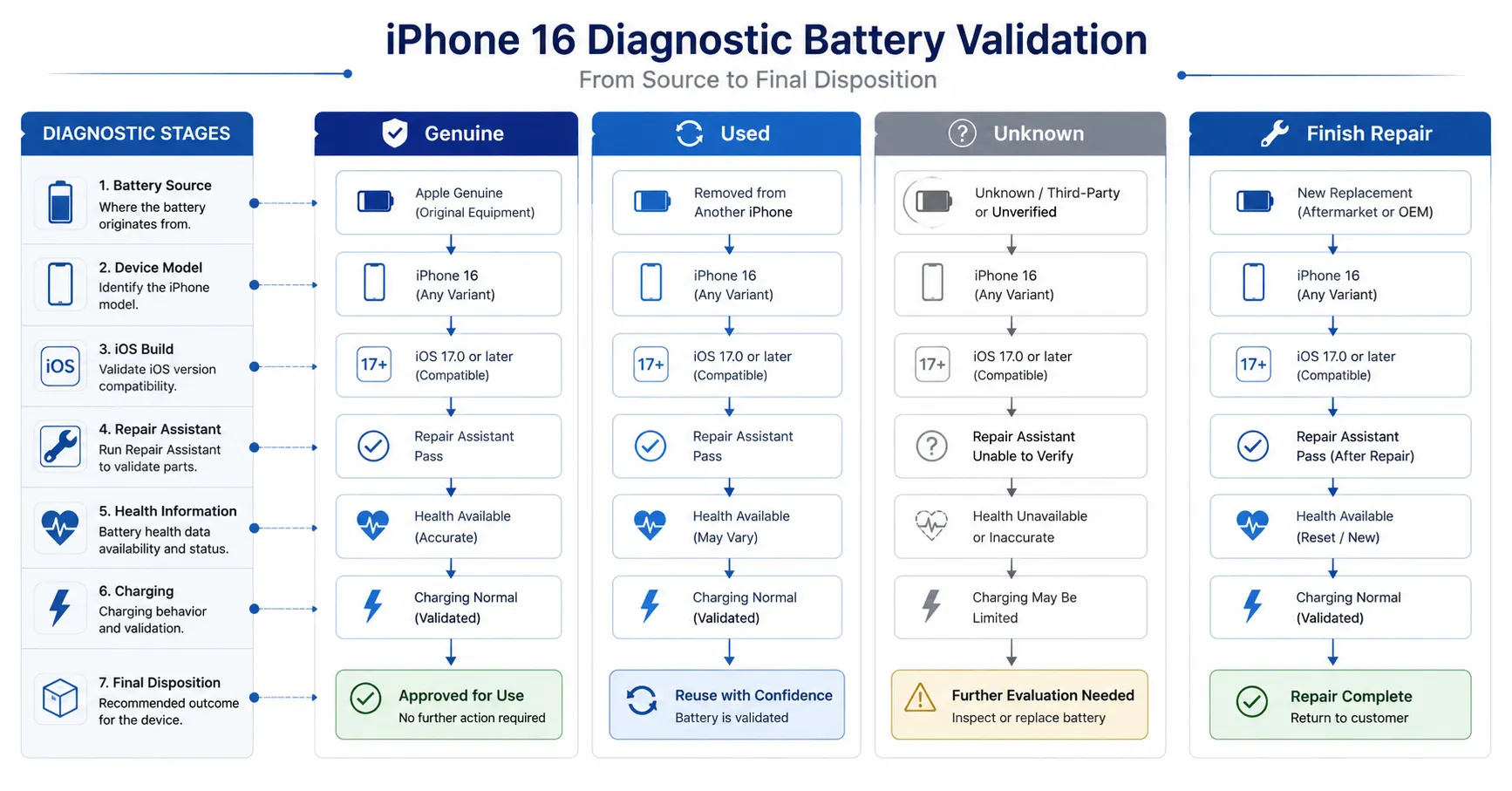
Apple’s Parts and Service History guidance describes several possible states:
- Genuine: the repair was completed using genuine Apple parts and processes.
- Used: the part was previously used or installed in another iPhone.
- Unknown: the part may not be genuine, may not function as expected, may not have been verified and linked after repair, or may have been modified.
- Finish Repair: the repair still requires completion through Repair Assistant.
These definitions mean status cannot be predicted from the battery label alone. Source history, verification, repair completion, supported model, software, and network conditions can matter.
Do Not Equate Genuine Display With New-Battery Condition
A screen status is not a capacity test, physical inspection, or safety certificate. Even when a status appears favorable, the buyer should still verify:
- battery source and production batch;
- new or previously installed condition;
- physical dimensions and installation fit;
- open-circuit voltage and internal resistance;
- controlled capacity;
- temperature during charge and load;
- percentage progression and shutdown;
- traceability and warranty.
Conversely, Used is not the same as counterfeit. Apple uses it for a genuine part that was previously installed in another iPhone. Do not describe a Used status as proof of a fake battery.
Use a Four-State Validation Matrix
| Status | What to record | Questions for the supplier | Buyer action |
|---|---|---|---|
| Genuine | Source, model, iOS build, repair process, screenshots, repeat result | Was the part new, how was the repair completed, and can the result be reproduced? | Continue physical and performance validation |
| Used | Previous installation history, source device, condition, removal method | Was reuse disclosed and is the part eligible for the intended channel? | Apply used-part risk and disclosure process |
| Unknown | Exact message, installation, connection, function, software, modification | Is the part unsupported, unverified, modified, faulty, or incorrectly installed? | Hold and investigate |
| Finish Repair | Prerequisites, network, charge, account, Repair Assistant result | Can the repair be completed under the supported workflow? | Complete or classify the blocking condition |
Test Every iPhone 16 Model Separately
Do not treat the iPhone 16 family as one device. Build separate rows for:
- iPhone 16;
- iPhone 16 Plus;
- iPhone 16 Pro;
- iPhone 16 Pro Max;
- regional or hardware variants where relevant.
For each model, document battery part reference, dimensions, flex cable, connector, label, test device, storage variant, region, and initial hardware condition. A result from an iPhone 16 Pro Max should not be copied into the specification for an iPhone 16.
Control the Battery Source
Status validation is meaningless when sample origin is unclear. Separate:
- new genuine parts obtained through an authorized path;
- previously used genuine parts from the same supported model;
- new third-party replacement batteries;
- third-party diagnostic solutions;
- modified or reprogrammed assemblies;
- unknown-source samples.
Do not mix the samples in one test result. Record supplier, batch, part marking, source device where applicable, installation history, and whether the battery has been modified.
Apple’s Parts Support for iPhone guidance also warns that adhesively installed used battery cells can be damaged during removal. Previously installed batteries require physical, safety, and disclosure controls beyond status testing.
Establish the Pre-Installation Baseline
Before installing the sample, record:
- battery model and sample ID;
- source and claimed function;
- dimensions, flatness, connector, and flex condition;
- open-circuit voltage and internal resistance;
- charge condition and storage history;
- controlled capacity if available;
- target phone condition;
- current iOS version and build;
- previous Parts and Service History;
- Battery Health and diagnostic screenshots.
This allows the team to identify whether the status change was caused by the battery, device history, repair state, or software update.
Use a Repeatable Installation Workflow
Standardize disassembly, connector handling, adhesive placement, battery seating, enclosure closure, and disturbed-function checks. Record technician, date, tools, deviations, and photographs.
Before final closure, confirm:
- connector seating;
- flex alignment;
- absence of physical pressure;
- stable boot;
- battery detection;
- normal initial temperature;
- basic charging response.
Do not force a thick or misaligned battery into the device merely to obtain a favorable system screenshot.
Record the Latest iOS Precisely
Every report should include the exact version and build number. “Latest system” changes over time and cannot support a repeatable result.
Test at least:
- current commercial build before installation;
- same build after installation;
- after internet connection;
- after Repair Assistant where applicable;
- after restart;
- after the next commercial update;
- on iOS 27 beta only as a separate pre-release observation;
- on the final iOS 27 public release when available.
Maintain screenshots for every stage and do not overwrite an earlier result.
Test Repair Assistant Conditions
Apple states that Repair Assistant requires supported hardware, current software, Wi-Fi, and sufficient charge. It may also be affected by part or account status.
Record:
- status before starting;
- device charge level;
- network type;
- Apple Account or part-lock condition where relevant;
- each workflow step;
- exact error message;
- status after completion;
- status after restart and reconnection.
Do not claim the battery failed when the blocking condition is network, software, account, or Activation Lock.
Verify Genuine Versus Used as a Supplier Claim
A supplier claiming Genuine rather than Used should provide a test package containing:
- battery source classification;
- device models and sample quantities;
- iOS version and build;
- pre-install status;
- installation and repair-completion procedure;
- before-and-after screenshots;
- repeat test after restart and internet connection;
- result after a later software update;
- known limitations and failure cases;
- raw charging and performance data.
The Genuine vs Used battery status result should be repeated across multiple batteries and multiple phones. A single edited video is not sufficient evidence for a wholesale claim.
Validate Battery Health and Diagnostic Information
Record whether Battery Health, maximum capacity, cycle count, manufacturing information, first-use information, or other diagnostic fields appear. Feature availability may depend on the device, part, and system.
Compare system information with controlled measurements. A displayed 100% value does not prove that the battery delivered its rated ampere-hours under an approved test. Conversely, a temporarily unavailable estimate does not automatically prove low physical capacity.
ESC’s existing iPhone Battery Health display guide can provide general background. This article should remain focused on iPhone 16 diagnostic sample validation.
Test Charging, Temperature, and Runtime
Status display does not replace performance testing. Use a known-good charger and cable. Control ambient temperature, starting percentage, device settings, and network activity.
Record:
- input voltage, current, and power;
- battery-percentage progression;
- charging interruption or throttling;
- temperature during charge and controlled load;
- runtime under a defined profile;
- shutdown percentage;
- restart and recharge behavior;
- physical condition after testing.
Compare with approved reference batteries of the same model. Investigate any solution that achieves a favorable status display but produces poor fit, abnormal heat, unstable charging, short runtime, or inconsistent capacity.
Build a Batch Acceptance Plan
After sample approval, translate results into lot controls:
- model and label identity;
- dimensions and connector inspection;
- open-circuit voltage and resistance sampling;
- capacity sampling;
- installation sampling across iPhone 16 variants;
- Parts and Service History screenshot;
- Battery Health and diagnostic check;
- Repair Assistant result where applicable;
- charging and temperature sampling;
- quarantine and corrective-action rules.
Use ESC’s mobile phone battery incoming inspection guide for the broader lot-release structure.
Control Software Updates After Approval
Approval should have a software-validity field. Define when retesting is required:
- major iOS release;
- important maintenance update;
- change in Repair Assistant behavior;
- new system message;
- battery hardware or firmware change;
- new device variant;
- customer complaint cluster.
Do not assume an approved status will remain unchanged forever. Keep a reference sample and control device for regression testing.
Common Diagnostic-Battery Claim Errors
- Calling a market term an official Apple battery category.
- Promising Genuine status for every sample and system.
- Confusing Used with counterfeit.
- Ignoring the source and prior installation history.
- Using one iPhone 16 model to approve the whole family.
- Writing “latest iOS” without the build number.
- Testing only before Repair Assistant or only after it.
- Using a status screenshot as proof of capacity or safety.
- Hiding Unknown or failed samples from the report.
- Failing to retest after a major iOS update.
Frequently Asked Questions
Can an iPhone 16 diagnostic battery show Genuine?
Some market solutions report that result under particular conditions. Buyers should verify it on the exact model, battery source, iOS build, and repair workflow. It should not be promised universally without repeatable evidence.
Does Genuine prove the battery is new?
Do not infer condition from one screen alone. Verify source, installation history, physical condition, capacity, performance, and traceability.
Does Used mean the battery is fake?
No. Apple describes Used as a genuine part previously installed in another iPhone.
Why does the phone show Finish Repair?
The repair may still require Repair Assistant. Check software, Wi-Fi, charge level, part status, account conditions, and the supported workflow.
Should status be tested on iOS 27 beta?
It can be observed for preparation, but beta results are not final compatibility guarantees. Repeat the test on the commercial release.
What evidence should a wholesaler request?
Request sample identity, source, device matrix, build numbers, repair steps, screenshots, raw performance data, repeatability, failure cases, and update plans.
Validate the Claim, the Battery, and the Workflow
An iPhone 16 diagnostic battery program should verify more than a favorable label in Settings. The buyer must connect battery source, physical quality, electrical performance, repair completion, exact software build, system status, charging, runtime, and batch consistency.
Send ESC your target iPhone 16 models, required diagnostic functions, order quantity, and validation conditions. ESC can prepare model-level samples and test records. Genuine, Used, Unknown, or Finish Repair behavior must be reported as an observed result for the tested configuration, not as an unconditional Apple-authorized guarantee.
External Source References
- Apple Support — About iPhone Parts and Service History, 2026
- Apple Support — Use Repair Assistant to Finish an iPhone or iPad Repair, 2026
- Apple Support — Parts Support for iPhone, 2026
- Apple — iOS 27 Preview, 2026