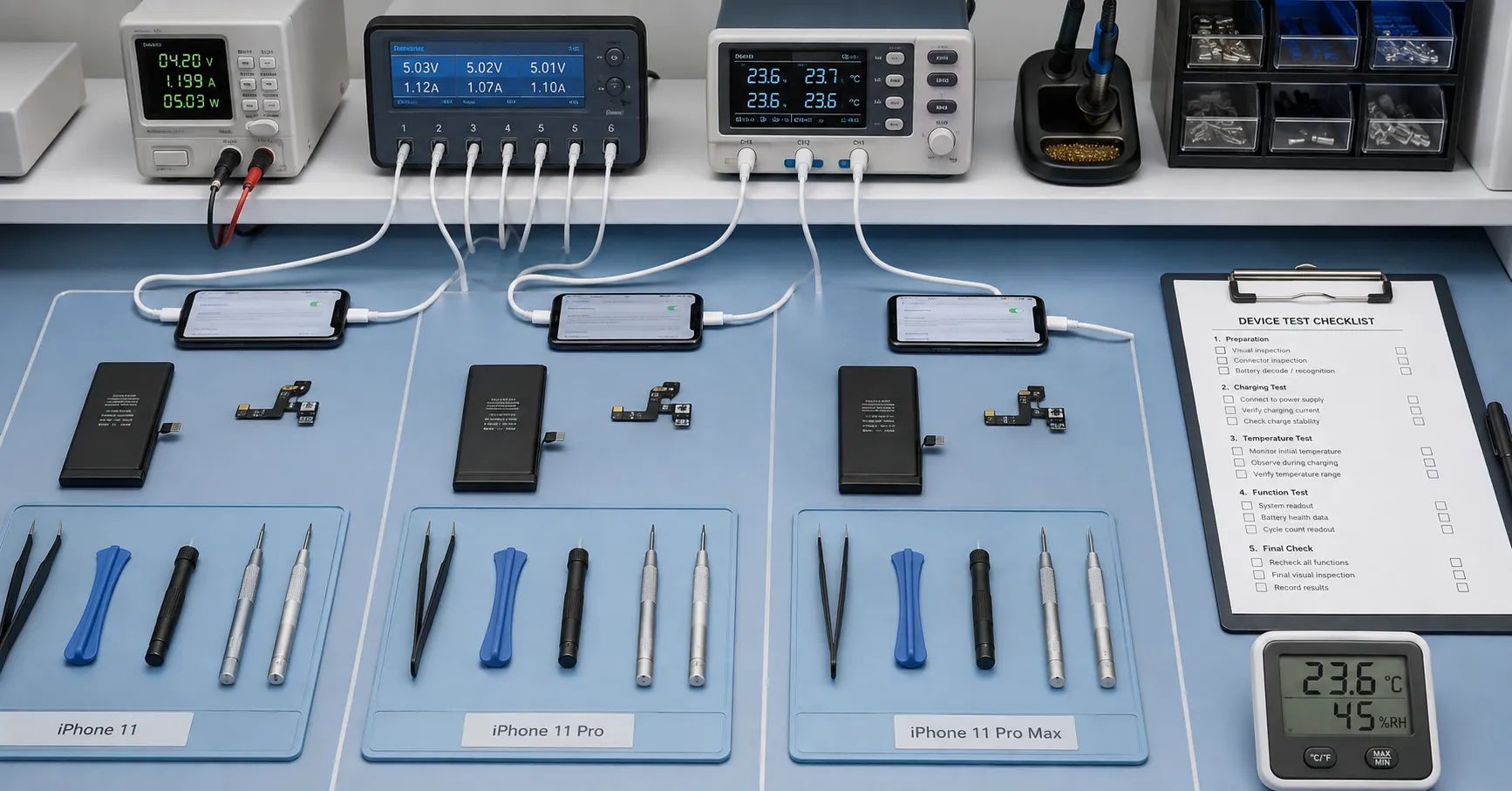
An iPhone 11 decode battery should be purchased as a model-specific repair component with documented acceptance evidence, not as a universal “no popup” solution. A finished no-solder design may remove a board-transfer, welding, added-flex or on-site programming step from some repair workflows. It does not remove the need to verify mechanical fit, electrical behavior, charging, capacity, temperature, battery-information screens, notifications and production consistency.
Repair chains should qualify iPhone 11, iPhone 11 Pro and iPhone 11 Pro Max separately. Approval for one device does not establish compatibility with the other two. “Decode battery” is repair-market terminology rather than an Apple part category, so it must not imply Apple origin, authorization or a permanent system-status outcome.
Define the No-Solder Claim Precisely
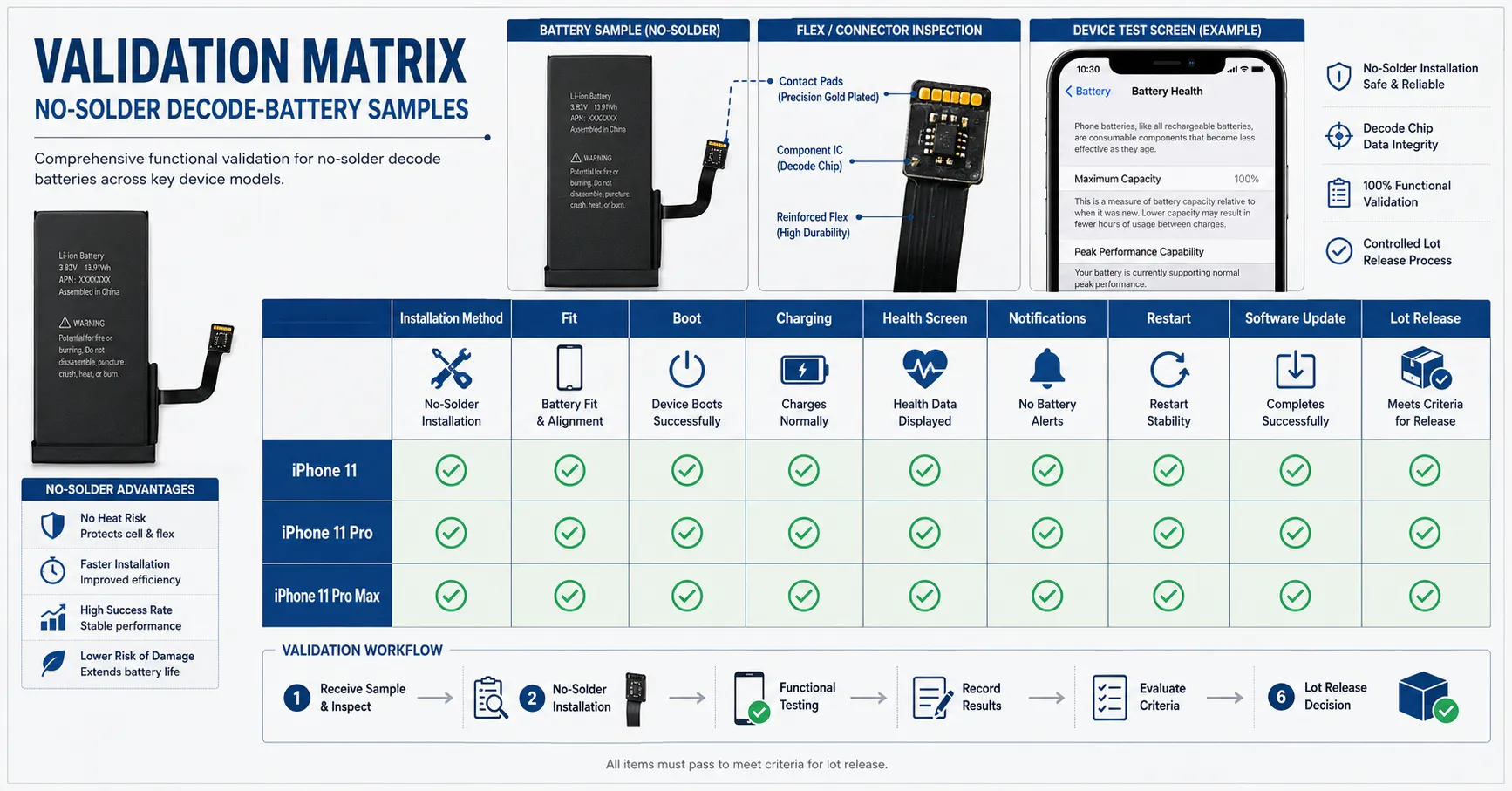
Before requesting samples, ask the supplier to show exactly what the technician receives and which operation is eliminated. A no-solder iPhone 11 battery may be described as a finished assembly that avoids transferring the previous battery board or making a new welded connection during installation. Another design may still require programming, data preparation or an accessory tool before shipment. These are different workflows and should not share one purchasing description.
Request an installation diagram, component photographs, mechanical drawing, supported-model list, tool list and revision number. The work instruction should identify every remaining step: opening the device, removing adhesive, disconnecting and removing the old pack, preparing the enclosure, installing new adhesive, connecting the replacement, reassembling and completing functional tests. “No solder” does not mean tool-free, skill-free or risk-free.
Keep Three Independent Approval Lanes
| Device lane | Minimum evidence | Release boundary |
|---|---|---|
| iPhone 11 | Device identity, regional variant, battery code, electronics revision, iOS build and complete test report | Only the verified iPhone 11 configurations |
| iPhone 11 Pro | Independent dimensions, fit, charging, temperature and software observations | Not inherited from iPhone 11 or Pro Max |
| iPhone 11 Pro Max | Dedicated samples, test devices and pilot-lot results | Not inherited from iPhone 11 Pro |
Assign a buyer-controlled sample ID to every unit. Link it to the full device identifier, sales region, supplier part code, battery label, cell lot, connector or flex revision, received date and test operator. This prevents a passed result from being attached later to a different model or construction.
If the supplier states that several regional device variants use the same battery, retain the evidence for each included variant. Commercial names and screen sizes are navigation aids; they are not sufficient compatibility keys.
Build a Risk-Based Sample Plan
Start with engineering samples to understand the construction and identify failure modes. Follow with a pilot quantity produced using normal materials, operators and process controls. Production-lot release should use a documented sampling plan appropriate to order size, past performance and failure consequences.
Do not combine the three device models or different electronics revisions into one sample pool. Use the mobile phone battery sampling plan as a general structure, then define model-specific tests and escalation rules. A successful development sample cannot by itself approve a bulk shipment.
Inspect the Battery Before Installation
Check shipping packaging for compression, puncture, moisture or mixed labels. Inspect the pouch, edge seals, tabs, insulation, connector, flex route, protection components, adhesive area and label consistency under suitable lighting. Measure length, width and thickness at specified points rather than relying on a single average value.
Quarantine samples with swelling, deformation, corrosion, torn insulation, displaced parts, damaged connectors, contamination, unusual odor or abnormal electrical condition. Do not bend, probe or force a questionable cell into a phone. The mobile phone battery incoming-inspection guide can support receiving controls and evidence capture.
Confirm Fit Without Creating New Damage
Install the sample in a known test device using trained technicians and an approved procedure. The connector should seat without unusual force. The flex should follow its intended route without pinching or sharp folding, and the pouch should remain flat without pressure from stacked components or excess adhesive.
Photograph the open-device installation before closing the enclosure. After reassembly, inspect display seating, perimeter gaps and any sign of lift or rocking. A phone that boots is not an automatic fit pass. Local compression can remain hidden until the device warms, experiences handling or stays in service.
Separate System Presentation From Battery Performance
Apple's Parts and Service History guidance states that iPhone 11 models can provide information about the battery and display. Apple explains that an Unknown status can appear when a part is nongenuine, is not functioning as expected, has not been verified and linked after repair, or has been modified. Therefore “no unknown part” should be recorded as an observed result for a named device and iOS build, not advertised as a permanent universal guarantee.
Apple's iPhone battery-support page also notes that health information may be inaccurate when a battery cannot be verified. A decode battery health display result is consequently a user-interface observation. It does not prove measured capacity, cell grade, remaining life or safety.
Keep the acceptance report in two parts. The first covers system presentation: Settings notifications, Battery Health, Parts and Service History and any service message. The second covers battery performance: fit, charging, discharge, capacity, temperature, runtime and consistency. A sample must satisfy the agreed requirements in both categories.
Use a Repeatable Software Test Sequence
- Record the device identifier, baseline iOS build and pre-repair behavior.
- Install the sample and capture the first unlock and initial Settings notifications.
- Record the Battery Health page, Parts and Service History and charging indication.
- Restart the phone and repeat the observations.
- Complete the agreed charging and operating cycles, then check again after the defined waiting period.
- Test a planned iOS update on non-production devices before approving it across the repair network.
Use screenshots linked to the device and sample ID. Record what appeared, what did not appear and when each observation was made. Avoid a simple “passed health” box because it cannot explain a later difference after restart, time or software change.
Test Charging and Stable Operation
Confirm normal boot, stable operation, wired charging and wireless charging where applicable. Observe charge recognition, interruption, unexpected restart, shutdown and abnormal drain. Standardize the charger, cable, ambient temperature, starting state of charge, device settings, network condition and test duration.
Compare several candidate units with a known reference under the same conditions. An isolated success is weak evidence; repeated behavior across devices and component lots is more useful. Investigate patterns rather than accepting a supplier's selected demonstration unit.
Verify Capacity, Runtime and Temperature
A printed capacity is a specification claim, not an acceptance result. Define the equipment, charge-discharge method, environmental conditions and reporting format before testing. Retain individual values and dispersion, not only the best result or batch average. Capacity acceptance must be linked to the exact battery model and method.
Device runtime is influenced by screen settings, network, applications, background activity, software and test-phone condition. Use a controlled workload and a stable comparison device. Temperature should be measured at defined positions and intervals during agreed charging and load conditions. A repeatable abnormal difference is a Hold trigger, while one surface reading cannot establish overall safety.
Measure Whether the Workflow Is Actually Simpler
The commercial value of a decode design should be demonstrated with operations data. Measure technician touch time, setup time, installation failures, device reopenings, final-test time and first-pass yield. Use operators with comparable training when benchmarking against a transplant or conventional finished-pack workflow.
A simpler connection step may reduce training or remove specialized equipment, but material price alone does not establish total savings. Include tools, fixtures, consumables, rejected batteries, rework, damaged devices, throughput, warranty and inventory. The companion total-cost article can support this calculation without turning unverified savings into a product claim.
Define Failure Categories and Disposition
Classify failures as packaging, appearance, dimensions, connector, electrical screening, installation, charging, capacity, temperature, runtime, software presentation, device condition or undetermined. Each category needs a disposition: accept, rework under an approved method, return to supplier, scrap through an appropriate route or investigate further.
Link field claims to the device model, iOS build, battery lot, operator and installation date. The battery warranty-claims workflow helps separate battery, installation, software and host-device causes instead of treating every complaint as the same defect.
Move From Samples to Pilot-Lot Approval
After sample approval, freeze the battery code, cell specification, electronics revision, connector, flex, mechanical drawing, label, packaging, work instruction and test method. The pilot lot should be made with normal production materials and controls. Inspect results by model and do not average away one weak lane.
Set explicit Hold and Reject triggers for mixed identity, dimensional drift, abnormal voltage distribution, fit interference, charging faults, unusual heating, inconsistent screen behavior, elevated rework or unexplained performance spread. A conditional release should state the quantity, market, limitation, responsible approver and corrective action.
Control Changes After Approval
Require notification before a change to the cell, protection electronics, connector, flex, firmware, insulation, adhesive, factory site or production process. Review how the change could affect fit, electrical behavior, charging, capacity, temperature, software observations and reliability. Repeat the affected tests before accepting the revised configuration.
Keep old and new revisions traceable. Do not silently overwrite the approval record, because a return may need to be matched to the exact construction shipped months earlier. Review lot and claim trends regularly and suspend a mapping when evidence no longer supports it.
Write Product Claims That Match the Evidence
A listing may describe the validated installation method and supported model under defined conditions. Avoid “100% compatible,” “always displays health,” “permanently no popup” or “never shows Unknown Part.” Safer wording identifies the device model, tested software build and need for buyer-side sample confirmation.
Do not call an independent replacement part genuine Apple, Apple-authorized or OEM Apple. A favorable status screen does not establish brand origin or authorization. Packaging and sales training should preserve this distinction.
Prepare a Decision-Ready RFQ
Provide the expected mix of iPhone 11, 11 Pro and 11 Pro Max; target regions; current and planned iOS versions; monthly volume; existing repair method; available tools; technician skill; and the exact connection step expected to be removed. Define separate acceptance criteria for health information, notifications and Parts and Service History.
Also provide the capacity method, charging and temperature tests, sampling plan, packaging, labeling, traceability and change-notification requirements. ESCCharge can discuss a model-separated sample and pilot structure after reviewing these inputs. Compatibility, displayed behavior, capacity, MOQ, lead time, certification availability, warranty and performance limits must be confirmed for the actual product, market and agreement.
Frequently Asked Questions
Does no-solder mean technicians need no tools?
No. It describes an omitted connection or transfer step, not the complete removal, installation and validation workflow.
Can one approved sample cover all three iPhone 11 models?
No. Each model needs separate mechanical, electrical, functional and software evidence.
Does a visible health value confirm actual capacity?
No. Verify capacity with a controlled test method and keep the result separate from the interface display.
Can the absence of a notification be guaranteed after every update?
No. Maintain a software regression plan and test planned updates on controlled devices.
What should trigger revalidation?
Relevant changes to the cell, electronics, connector, flex, firmware, insulation, adhesive, manufacturing process or target software should trigger risk-based review.