iPhone Face ID Repair: What is the right solution?
Anyone who iPhone Face ID Repair Anyone wishing to do so should first find out whether there is a faulty setting, a hidden camera, a temporary software problem, or an actual defect in the TrueDepth camera system.
Not every facial recognition problem requires replacing a component. Sometimes it's enough to clean the camera cover, check the settings, restart the device, or set up Face ID again.
The situation is different if the iPhone reports that Face ID is unavailable, the TrueDepth camera is faulty, or facial recognition no longer works after a display replacement or other repair.
In such cases, it must be checked whether a hardware problem, a damaged connection, an incorrectly calibrated replacement part, or a pre-existing defect is the cause.
The most important answer first: Face ID repair is generally possible. However, the most suitable repair method depends on the iPhone model, the actual cause of the malfunction, the condition of the TrueDepth components, and the available official repair and calibration procedures.
For professional repair shops, the question goes even further.
A technician must not only decide whether the function can be restored. He must also determine whether a repair is economically viable, which components are affected, and how to prevent the same customer from returning with another problem a few days later.
Reliable diagnostic and documentation processes are particularly important for refurbishment companies, repair chains, and spare parts wholesalers. A misdiagnosed Face ID problem can lead to unnecessary component replacements, longer turnaround times, customer complaints, and additional warranty work.
This guide therefore combines practical troubleshooting with professional repair diagnostics and quality control.
What is Face ID and how does the TrueDepth camera work?
Face ID is Apple's biometric authentication system for supported iPhone models.
Among other things, it enables unlocking the device, confirming certain payments, and logging into supported applications.
Unlike traditional facial recognition based on a regular camera image, Face ID uses a special TrueDepth camera system.
This captures information about the spatial structure of the face and processes it for secure authentication.
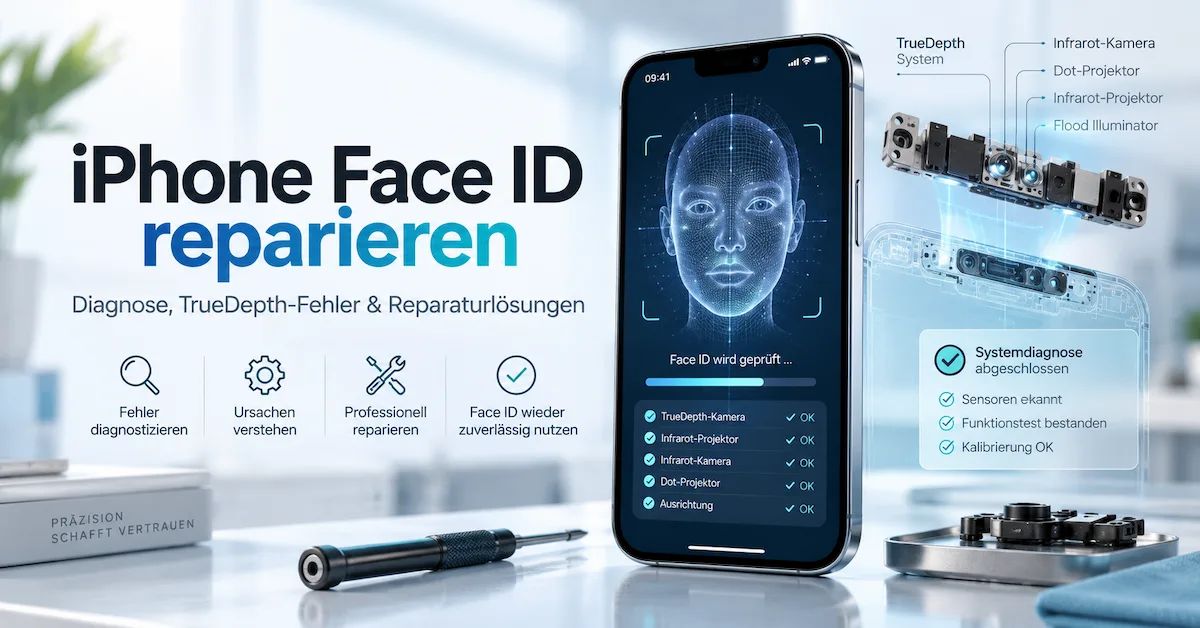
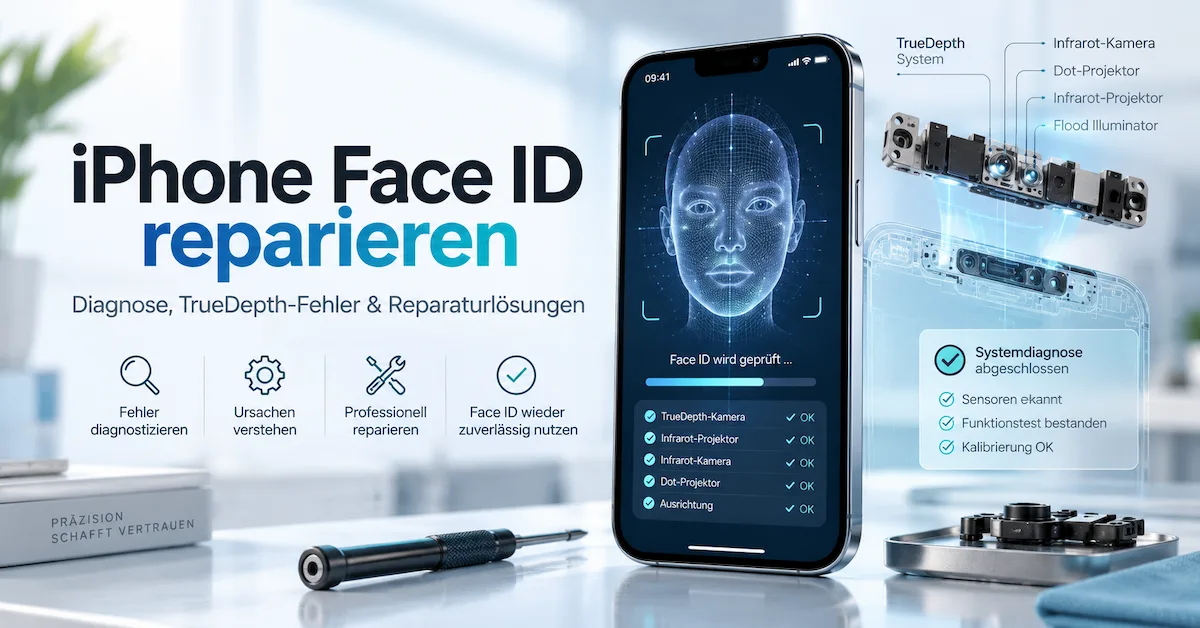
Which components are involved?
The basic technical elements include:
Infrared camera: Captures infrared information used for facial recognition.
Punktprojektor (Dot Projector): Projects a structured infrared pattern to provide depth information.
Infrarotbeleuchtung (Flood Illuminator): Supports facial recognition under different lighting conditions.
TrueDepth-System: It processes the necessary optical information in conjunction with the device hardware and security architecture.
Secure Enclave: Protects security-relevant information required for biometric authentication.
The interplay of these components is crucial.
A working selfie image therefore does not automatically mean that all components required for Face ID are also working perfectly.
Similarly, a black or faulty front camera does not necessarily mean that every element of the TrueDepth system is damaged.
Both observations are clues, but not a complete diagnosis.
Why is Face ID more difficult to repair than a normal camera?
An ordinary camera is primarily used for taking pictures.
Face ID, on the other hand, is part of a security-critical system.
This is not just about visual quality, but also about the reliable identification of an authorized person.
For this reason, spare part identity, supported components, repair procedures, and calibration can be crucial for recovery.
A mechanically compatible component is not automatically a fully functional replacement for a biometric component.
For repair shops, this means: Successful installation of a replacement part does not equate to a completed Face ID repair.
Face ID not working: How to correctly distinguish the symptoms
Before a repair shop opens the iPhone, they should describe the fault precisely.
The following overview helps to classify common symptoms.
| Symptom | Possible cause | First measure |
|---|---|---|
| Face ID occasionally fails to recognize the face | Camera obscured, viewing angle, appearance | Check camera and usage situation |
| Face ID doesn't work immediately after restarting | Security-related code prompt | Enter device code |
| Face ID cannot be configured | Software problem or TrueDepth error | Check settings and error message |
| "Face ID is not available" | System or hardware problem possible | Perform a diagnosis |
| TrueDepth camera reports a problem | Camera or repair calibration problem possible | Professional inspection |
| Face ID does not work after screen replacement | Damage due to repair or configuration problem possible | Check repair progress |
| Face ID doesn't work after camera replacement | Component identity or lack of calibration | Check parts and service history |
| Face ID doesn't work after battery replacement | Repair process, connection, or independent defect possible | Before-and-after diagnosis |
| Face ID only works poorly in certain lighting conditions. | Covering, privacy film or optical conditions | Control environment |
| Face ID fails despite a functioning selfie camera | TrueDepth components may be affected separately. | Professional Hardware Diagnosis |
This table shows why a general recommendation like "reset Face ID" is not sufficient in every case.
It can be useful in the case of a temporary detection problem. However, it does not solve the underlying problem in the case of a physical defect.
1. Repair Face ID without opening the iPhone
The initial diagnostic phase should be limited to measures that do not require disassembly of the device.
These steps are particularly suitable for private users and the first customer contact in repair shops.
Step 1: Update iOS
Outdated software can cause errors or contain known problems.
Therefore, first check if a supported software update is available.
Open:
Settings → General → Software Update
Install an available update after performing the necessary data backup.
Then restart the device and test Face ID again.
However, an update is not proof that a hardware defect can be fixed.
If the TrueDepth camera is physically damaged, a new iOS version will not automatically repair the defective component.
Step 2: Check Face ID settings
Open:
Settings → Face ID & Passcode
Check if Face ID is set up and enabled for the desired functions.
This can include:
-
Unlock iPhone
-
App Store and supported purchase processes
-
Wallet und Apple Pay
-
Password autofill
-
supported third-party apps
Sometimes facial recognition works for unlocking, while logging into a specific application is not possible.
In this case, you should first check whether the corresponding function is activated.
A problem in a single app does not automatically mean the TrueDepth camera is defective.
Step 3: Clean the camera and upper display area
The TrueDepth camera must be able to capture the face sufficiently.
Dirt or objects in the camera's field of view can impair detection.
Check in particular:
-
Fingerprints on the display
-
Dust and dirt
-
incorrectly positioned protective films
-
damaged or unsuitable privacy films
-
Cases that cover the camera area
-
visible damage in the upper display area
Clean the surface carefully with a suitable, soft cloth.
Do not use harsh cleaning agents and do not attempt to introduce liquid into openings or crevices.
Important: Cleaning the exterior is a routine maintenance task. Disassembling TrueDepth components, on the other hand, is a specialized repair job.
Step 4: Check detection distance and alignment
Face ID requires a suitable distance between the face and the device.
For typical Face ID applications, a distance of approximately 25 to 50 centimeters is a reasonable starting point.
Make sure the camera is pointed at the face.
On older iPhone models, Face ID only works in portrait mode.
For iPhone 13 models and newer supported devices, landscape mode is also possible from iOS 16 onwards.
The exact functions depend on the model and software version.
Keep the device as still as possible during the test and do not change multiple conditions at the same time.
Step 5: Remove sunglasses and face covering
Certain sunglasses can block infrared light.
Even a face mask or other coverings can affect recognition.
Try removing such obstacles as a test.
If Face ID works again afterwards, it may not be necessary to replace any components.
Face ID can be set up with a mask on supported devices. However, this feature has model- and software-dependent requirements.
Step 6: Restart iPhone
A restart can resolve temporary software problems.
After restarting, the device code must first be entered.
This is a normal safety feature.
Only test Face ID after the device has been unlocked with the code.
A common diagnostic error is to interpret the first code request after a restart as a Face ID defect.
Step 7: Reset Face ID
If the previous measures are unsuccessful and the facility remains available, re-registration may be advisable.
Open:
Settings → Face ID & Passcode → Reset Face ID
Then set up Face ID again.
Observe carefully whether the process can be completed.
If the device repeatedly aborts facial recognition, displays a TrueDepth error message, or registration is not possible at all, the same reset should not be performed endlessly.
Then a more targeted diagnosis is needed.
2. When is a code request normal and not a Face ID defect?
An iPhone may request the device passcode even though Face ID technically works.
This is an important difference that is often insufficiently explained in many general repair manuals.
Apple uses the device passcode as a fundamental security mechanism. Biometric authentication does not completely replace it.
A code entry may be required, for example, if:
-
the device has just been switched on;
-
the iPhone was restarted;
-
it has not been unlocked for a long time;
-
several biometric identification attempts have failed;
-
a security-relevant procedure was carried out;
-
The device was remotely locked.
An example:
A customer restarts their iPhone and expects Face ID to immediately handle the first unlock.
The device requests the code instead.
The customer suspects a defect.
In fact, this is usually the intended safety behavior.
For service companies, it is worthwhile to recognize such situations as early as when accepting a device.
A brief explanation can prevent unnecessary diagnoses and incorrect repair orders.
3. TrueDepth camera defective: When is a hardware repair necessary?
If facial recognition does not work despite correct settings, a free camera, an up-to-date operating system and a successful restart, the hardware must be investigated as a possible cause.
The following situations are particularly relevant:
Fall damage: A mechanical shock can damage internal components or connections.
Liquid damage: Moisture can impair contacts, electronic components, or circuit traces.
Previous repair: A previous display, camera, or other internal repair may affect the diagnosis.
Damaged flex cable: A faulty or damaged connection can disrupt communication between components.
Defective camera module: Certain components of the TrueDepth system may be damaged.
Incomplete repair calibration: A supported replacement part can be installed without the necessary completion process having been carried out.
These causes cannot be reliably distinguished based solely on a search query or a single symptom.
Is it easy to replace the TrueDepth camera?
Not in every case.
The answer depends on the specific iPhone model, the replacement part, and the official repair procedure.
The distinction between the following is particularly important:
-
a physically damaged component;
-
an incomplete repair process;
-
an unsupported spare parts configuration;
-
a fault in another area of the device.
An exchange may be advisable if a defect has been confirmed.
However, installing a mechanically compatible replacement module does not guarantee that the biometric function will subsequently be fully available.
The repair may need to be completed with a calibration procedure specifically designed for this purpose.
Why are untested TrueDepth repairs risky?
The Face ID system uses optical components, including infrared technology.
Improper interventions can not only cause new functional problems, but also impair safety mechanisms.
Therefore, work on these components should be carried out by appropriately trained technicians according to suitable repair specifications.
Furthermore, a repair shop should not promise that every TrueDepth error message can be fixed by soldering, resetting, or using a universal replacement sensor.
There is no universally valid technical basis for such promises.
4. Repairing Face ID after a display replacement
One particularly frequent question is:
Why does Face ID no longer work after a display replacement?
First, it needs to be determined whether Face ID was still working immediately before the repair.
This sounds obvious, but it is not always sufficiently documented in everyday workshop practice.
An iPhone with a broken display may already have other defects before it is opened.
If Face ID worked before and fails immediately after the repair, the repair process needs to be examined more closely.
What errors could be the cause?
Possible causes include:
-
a connection damaged during repair;
-
mechanical stress on the upper sensor area;
-
an unsuitable or damaged replacement part;
-
an undetected pre-existing condition;
-
an incomplete repair configuration;
-
a pre-existing hardware defect that was only discovered later.
The diagnosis should be based on documented findings.
Proximity to the repair is important, but it does not replace root cause analysis.
What should the repair shop check?
Before disassembling again, the technician should:
-
to identify the exact iPhone model;
-
check the original repair order;
-
Compare existing before-and-after test results;
-
Document the displayed Face ID error message;
-
to monitor the parts and service history;
-
Check if a supported calibration process is pending.
Only then should a decision be made as to whether further hardware work is required.
For safety-critical TrueDepth components, improvised repair methods must not replace a suitable service procedure.
Why is a function test important before replacing the display?
A professional initial assessment creates a documented starting point.
For example, he can note:
| Test function | Before repair | After repair |
|---|---|---|
| Face ID | Document the result | Check again |
| Front camera | Document the result | Check again |
| Touchscreen | Document the result | Check again |
| Displaydarstellung | Document the result | Check again |
| Charging process | Document the result | Check again |
| Battery status | Document the result | Check again |
This procedure protects both the customer and the workshop.
It also helps to identify systematic quality problems when multiple technicians or locations are involved.
5. Face ID doesn't work after battery replacement: Is it the battery?
A Face ID failure after a battery replacement often leads to the assumption that the new battery is incompatible.
However, that is not a sufficient diagnosis.
An iPhone replacement battery is not itself the TrueDepth camera and does not directly control biometric facial recognition.
A malfunction of the facial recognition system after a battery replacement may be related to the repair process, but may not necessarily have been caused by the battery cell.
Possible causes after battery replacement
Several hypotheses come into consideration initially:
Pre-existing defect: Face ID may have been compromised even before the repair.
Damage caused by repairs: A connection or component may have been damaged during opening or reassembly.
Independent software problem: A subsequent error message may coincide with the battery replacement, without having been caused by it.
Other existing hardware problems: A previously damaged device may have additional defects.
Missing final exam: Face ID may not have been tested after the repair.
Why doesn't another battery replacement automatically solve the problem?
If the cause lies in the TrueDepth system, a second battery will not necessarily fix the defect.
Unplanned replacement of multiple batteries can cause additional costs and increase the risk of further mechanical damage.
Instead, the workshop should check:
-
Which battery was installed?
-
Does the replacement part fit the exact iPhone model?
-
Which functions were tested before the repair?
-
Which functions failed afterwards?
-
Are there any indications of a damaged connection?
-
What message appears during Face ID setup?
These questions allow for a significantly more precise handling of complaints.
What role does the quality of the replacement battery play?
A suitable battery is important for a reliable power supply and the safe operation of the device.
However, it should not be marketed as a solution for a confirmed TrueDepth defect.
For professional workshops, this means that battery quality and Face ID function must be evaluated separately.
ESC bietet iPhone and smartphone replacement batteries for professional repair shops an.
The product range includes different battery variants for workshops, refurbishment companies, wholesalers and private label customers.
The battery selection should be based on the exact device model and the requirements of the respective repair process.
6. Face ID after camera replacement: Why calibration is crucial
Modern iPhone repairs involve more than just the physical replacement of a component.
The software-assisted completion of the repair can also be crucial.
Apple provides the Repair Assistant for supported devices and components.
What is the repair assistant?
The Repair Assistant is a procedure provided by Apple that can be used to complete certain supported repairs and set up required calibration data.
The parts and devices that are supported depend on the model.
Particularly with safety-relevant components, an incomplete calibration can result in biometric authentication being unavailable.
When should a repair shop check the repair assistant?
For example, when:
-
a supported camera was replaced;
-
a component appears as not yet fully configured during the service process;
-
Calibration is required after a repair;
-
A supported used original component was installed.
For iPhone 16 models and newer supported models, suitable used original front cameras from devices of the same model can also be reused under certain conditions.
Current model approvals and calibration requirements are crucial in this regard.
This possibility should not be interpreted as a general release for any camera module.
Prerequisites for repair calibration
According to Apple's published repair procedure, the following are typically required:
-
a supported combination of devices and components;
-
a current supported iOS version;
-
a suitable Wi-Fi connection;
-
a battery charge level of more than 20 percent;
-
the necessary access to the device and, if applicable, further permissions.
The process is started via the designated settings of the iPhone, provided the corresponding repair is displayed there.
What does "complete repair" mean?
This message indicates that a repair is pending for a particular component.
It does not automatically mean that the part is physically damaged.
If a TrueDepth camera is affected, Face ID may only be available for biometric login again after successful completion of the intended calibration process.
Therefore, the workshop must be located between Component defect and incomplete configuration differentiate.
Replacing other components without checking for this difference can cause unnecessary costs.
7. Original part, used original part or third-party component?
The spare parts strategy is a key component of a professional Face ID repair.
Not every component with the same external shape possesses the same technical and safety-relevant properties.
| Spare part type | Possible advantages | Important limitations |
|---|---|---|
| New genuine Apple part | Manufacturer-defined repair and quality requirements | Check availability, price and supported method |
| Used original Apple part | May be a repair option for supported models. | Check origin, model similarity, condition and calibration |
| Third-party component | Potentially different procurement costs | Biometric compatibility and security requirements are particularly critical. |
| Repair of existing original component | In cases of confirmed individual defects, this can be an option for specialists. | No universal repair success; specialist knowledge required. |
Why is the origin of the component important?
The identity of the component may be relevant for the repair process.
For used original parts, the previous use, the physical condition and possible activation or configuration requirements also play a role.
A reputable repair shop should explain these factors before carrying out the repair.
Can third-party components automatically restore Face ID?
No, that cannot be said in general.
Especially with biometric authentication, there are security-related restrictions.
An externally compatible camera module is not automatically suitable for secure Face ID use.
Workshops should therefore not make blanket compatibility promises that have not been confirmed by the supported repair procedure or by a successful functional test.
8. Professional Face ID Diagnostics: A Standardized Workshop Process
For a single repair, an experienced technician can draw on many observations from practical experience.
However, for a repair chain with multiple locations, a purely subjective diagnosis is not sufficient.
A documented process ensures that the same error message does not lead to a different decision at each location.
Phase 1: Device Acceptance
Capture:
-
iPhone-Modell;
-
Serial or internal device identifier according to data protection regulations;
-
reported symptom;
-
Time of first occurrence;
-
Damage from falls or liquids;
-
previous repairs;
-
current device status;
-
visible damage.
Also ask if the customer saw an error message.
If possible, their wording should be documented.
"Face ID doesn't recognize me well" is different from "Face ID cannot be activated".
Phase 2: Software testing
Only perform the steps that make sense if the defect has not yet been located:
-
Check iOS version.
-
Check Face ID settings.
-
Check camera area.
-
Test the recording conditions.
-
Restart your device.
-
Retest facial recognition.
-
If the starting point is suitable, reset Face ID and set it up again.
Document at which step the behavior changes.
Phase 3: Repair History
Check if the device has already been opened.
Ask about:
-
Displaywechsel;
-
Akkutausch;
-
Camera repair;
-
Water damage treatment;
-
previous circuit board work.
A traceable repair process reduces unnecessary assumptions.
Phase 4: Parts and Service Flow
For supported iPhone models, the area offers Settings → General → About Information about specific replaced components.
Check if any relevant repair instructions or a pending repair completion date are displayed.
The available information depends on the model and software version.
Phase 5: Secure Hardware Diagnostics
If the previous tests indicate an actual hardware defect, a decision must be made as to which further investigations are technically permissible and economically sensible.
Only qualified technicians should be used when working on the TrueDepth system.
The company should take into account appropriate manufacturer information, safety specifications, and testing options.
Phase 6: Repair Decision
The technician should now be able to answer at least four questions:
-
Which cause is demonstrably likely?
-
Which repair method is supported?
-
What are the risks?
-
How is the success subsequently verified?
If a question cannot be answered, a transparent further diagnosis is better than an unfounded promise of repair.
Phase 7: Final Examination
After the repair, the relevant functions should be tested again.
This can include:
-
Face ID setup;
-
Device unlocking;
-
Front camera;
-
relevant camera and depth functions;
-
Display;
-
Touchscreen;
-
Charging function;
-
Battery status.
Not every workshop needs to apply the same level of testing to all devices. However, the tests should be appropriate to the scope of the repair and the identified risks.
9. Face ID repair on refurbished iPhones
For refurbishment companies, a functioning facial recognition system has a special economic value.
A used iPhone with fully functioning biometric authentication can be assessed differently than an otherwise functional device with permanently deactivated Face ID functionality.
Therefore, the Face ID status should be recorded as soon as a used device is received.
Goods receipt inspection
A suitable refurbishment inspection includes:
Model identification: Which exact iPhone model is it?
Case condition: Are there any signs of damage from falls or visible deformations?
Camera status: Do the relevant camera functions work?
Face-ID-Status: Is setup and use possible?
Repair history: Does the device indicate any replaced or unconfigured components?
Battery status: Are there any signs of wear and tear or a previous battery replacement?
Data protection: Were personal data and existing device locks handled properly?
Why does Face ID need to be tested before refurbishment?
Suppose a company receives 500 used iPhones.
Some of them need new batteries. Other devices need a screen replacement.
If Face ID is only checked at the end of the preparation process, it is difficult to attribute a later detected error to a specific work step.
If, on the other hand, the function is documented upon receipt of goods, the company can distinguish between pre-existing errors and problems that arise later.
This reduces diagnostic effort and improves traceability.
Quality classes in refurbishment
A company can define different quality categories internally.
For example:
| Internal Category | Face-ID-Status | Further measure |
|---|---|---|
| A | Function confirmed | Continue the regular refurbishment process |
| B | Function unclear | Diagnosis required |
| C | Repair configuration pending | Review supported closing process |
| D | Hardware failure likely | Professional repair assessment |
| AND | Function not economically recoverable | Treat according to internal evaluation guidelines |
This classification is a possible internal process model, not an official Apple classification.
It helps companies to treat devices consistently and to compare the costs of different repair methods.
10. Repair Face ID or replace iPhone: What makes economic sense?
Face ID repair should not be evaluated solely on the basis of whether it is technically possible.
The economic decision depends on several factors.
Factors that influence the repair value
Device model: The market value differs significantly between older and newer iPhones.
Cause of error: A simple settings error causes different costs than a confirmed hardware defect.
Component availability: Not every spare part or procedure is available for every device.
Calibration requirements: Assisted repairs may need to be completed in full.
Device status: Further damage could worsen profitability.
Workload: Diagnosis, repair and final inspection take time.
Warranty and complaint risk: A fault that cannot be reliably reproduced and fixed can cause further costs.
A practical cost model
The following calculation may be helpful for workshops:
Total costs = diagnostic costs + spare parts costs + labor costs + calibration costs + expected rework costs
Specific prices must be obtained from the respective repair service provider.
A general fixed price would be misleading because the symptom "Face ID not working" can have very different causes.
When is a repair more worthwhile?
A repair is more economically viable if:
-
the device has a sufficient residual value;
-
the cause of the error has been clearly identified;
-
a suitable repair method is available;
-
the anticipated costs remain controllable;
-
so that the repair can be reliably completed and tested.
When should a repair shop advise against a repair?
A transparent rejection can be useful if:
-
the cause cannot be reliably identified;
-
no suitable repair method is available;
-
the safety requirements cannot be met;
-
the costs outweigh the economic benefits;
-
The customer demands a guaranteed success that cannot be technically promised.
Trust is not simply built by a workshop accepting as many repairs as possible.
It also arises from a clear explanation of when a repair is not recommended.
11. Face ID repair and replacement battery procurement: Two distinct quality tasks
In professional repair shops, several components are often checked or replaced in the same work order.
For example, an iPhone can simultaneously have a weak battery, a damaged display, and a malfunctioning facial recognition system.
In such cases, it is important not to mix up the fault diagnoses.
Why do the battery and Face ID need to be tested separately?
The battery is responsible for supplying power to the device.
In contrast, biometric authentication uses the TrueDepth system and its associated security architecture.
Therefore, a battery with sufficient capacity and stable electrical output does not confirm that Face ID is working.
Similarly, a functioning facial recognition system does not necessarily mean that the battery still provides the required power.
Which battery types do professional workshops need?
For procurement purposes, it makes sense to distinguish between several product types.
| Battery variant | Typical use | Important exam |
|---|---|---|
| Standard capacity | Conventional replacement | Model, capacity, voltage, connection |
| High capacity | Repair aimed at longer service life | Actual capacity, design, temperature behavior |
| Battery diagnostic-compatible | Certain professional repair procedures | Device model, iOS, installation and diagnostic behavior |
| Specialized no-pop-up solution | Selected repair configurations | Supported models and installation requirements |
| Battery cell without flex | Specialized repair procedures | Required expertise and components |
These variants are not automatically interchangeable.
A battery designed for a specific diagnostic procedure should not be equated with a standard battery simply because of its name.
Diagnostic-compatible iPhone batteries
ESC offers, among other things diagnostic-compatible iPhone replacement batteries for professional repair and refurbishment applications.
For such products, compatibility with specific battery diagnostic and display procedures is paramount.
However, the actual available functions must be confirmed for the specific iPhone model, the installed software, and the specific repair process.
Important: The diagnostic compatibility of a replacement battery does not mean that it can repair a defective Face ID camera.
This distinction in particular prevents false expectations among commercial buyers.
Further information on battery diagnostics can be found in the ESC guide. How Does an iPhone Diagnostic Battery Work?.
12. Quality control: How workshops reduce complaints after repairs
In a professional repair, success should not depend solely on whether the device can be switched on again after reassembly.
A functioning start screen does not necessarily prove that all affected functions have been successfully tested.
Therefore, a systematic final inspection is particularly important.
Before the repair
Record the current functional status.
Document any existing defects and inform the customer of any pre-existing damage.
During the repair
Work according to the technical procedures applicable to the device and the repair.
Use suitable components and avoid unnecessary stress on sensitive parts.
After the repair
Check the functions that might be affected by the work.
After a battery replacement, factors such as charging behavior, battery data, and general device functionality are relevant.
After replacing a display, the display, touchscreen and affected sensor functions should also be checked.
After working on the TrueDepth system, a successful biometric function test is particularly important.
Documentation and traceability
A repair file should show:
-
which components were used;
-
which tests were performed;
-
which errors were present;
-
which measures were taken;
-
which results were achieved;
-
whether a repair completion is pending.
Repair chains in particular can use such data to identify recurring problems.
For battery projects, supplier SKU, batch number and technical specifications can also be documented.
ESC describes in the area Company profile and quality control including tests of capacity, voltage, BMS performance, charging and discharging behavior, and aging tests.
These tests relate to the respective battery and charging products. They are not a certification of Face ID repair.
13. Why Face ID is important for evaluating used iPhones
A refurbishment company doesn't just sell hardware.
It sells a documented functional condition.
If the product description states that Face ID works, the buyer expects a usable biometric authentication system.
If the function is unavailable, this condition should be clearly stated.
Impact on resale
A Face ID error can affect:
-
the internal quality class;
-
the expected selling price;
-
the target group;
-
the warranty conditions;
-
the probability of returns;
-
the workload before the sale.
For commercial customers, repeatability is particularly important.
A standardized test prevents two identical errors from being assessed differently.
What role does the repair history play?
The parts and service history can provide important information for supported devices.
However, it does not replace a full functional test.
A device should not be considered faultless simply because a particular repair instruction is not visible.
Similarly, a relevant message should not automatically be interpreted as proof of a permanently defective sensor.
The final assessment must take into account the actual condition, the device model, and the supported repair processes.
14. Data protection and security during Face ID repairs
Face ID protects access to personal data.
Therefore, data protection is an essential part of a professional repair process.
Customers should not unnecessarily share their device code.
A workshop should use appropriate procedures to carry out necessary functional tests without uncontrolled access to private content.
The customer should know which tests are necessary and what information is required for them.
Biometric data must remain protected.
Repair processes must not be designed to circumvent biometric protection mechanisms.
Insecure attempts to interfere with biometric authentication are not a suitable alternative to a professional repair.
Previous data backup
Before undertaking extensive repairs, software restorations, or other measures that carry a risk of data loss, a suitable data backup should be arranged.
A repair shop should also disclose if certain repair steps might require restoration or additional authentication.
Clear consent and transparent communication
A professional repair order should clearly explain:
-
what is being tested;
-
which interventions are planned;
-
what risks exist;
-
whether personal data might be affected;
-
whether the repair success can be guaranteed;
-
which additional costs are possible.
This is not just an organizational issue.
It reduces misunderstandings and supports long-term customer trust.
15. Common Mistakes When Repairing iPhone Face ID
Error 1: Treating every code query as a defect
The device code is part of the normal security concept.
A restart or multiple failed recognition attempts may require code entry.
Mistake 2: Replace the camera immediately
Replacing a camera without a proper diagnosis may be unnecessary.
First, check settings, cover, software status, and repair history.
Error 3: Resetting Face ID multiple times
A reset can help in suitable software or setup situations.
However, it does not repair physically damaged components.
Mistake 4: Equating a working selfie mode with a working TrueDepth system
The standard front camera and the biometric functions do not use completely identical technical processes.
A selfie test alone is therefore not sufficient.
Error 5: Do not perform a function test after replacing the display.
Without final inspection, problems may only become apparent to the customer.
Error 6: Confusing calibration and hardware defect
A pending repair completion may look different than a physically damaged component.
Error 7: Treating battery and Face ID as the same source of error
Replacing the battery is not a general solution for a TrueDepth problem.
Mistake 8: Offering any replacement modules as fully compatible
For biometric components, supported repair procedures and security requirements must be taken into account.
Mistake 9: Unclear warranty promises
A business should not guarantee a full recovery until the diagnosis and repair options have been sufficiently clarified.
Mistake 10: Failure to conduct a documented before-and-after test
Without verifiable results, later complaints are significantly more difficult to process.
16. Purchasing guide for repair chains and spare parts wholesalers
Face ID repairs and battery replacements involve different technical systems.
Nevertheless, in everyday workshop operations, they are often part of the same service business.
For commercial buyers, it is therefore advisable to consider the entire spare parts supply and the quality of the repair processes.
First, analyze the repair volume.
Which iPhone models are most frequently edited?
How many devices need a battery replacement?
How frequently do combined injuries occur?
Which models cause the most complaints?
Such data helps to select the required spare parts in a targeted manner.
Procure spare parts according to repair requirements
Professional buyers should pay particular attention to the following when purchasing iPhone batteries:
-
exact model compatibility;
-
Nominal voltage;
-
actual capacity;
-
Design and dimensions;
-
Connection and flex cable;
-
internal protection functions;
-
Charging and discharging behavior;
-
Aging tests;
-
Traceability;
-
Required documentation.
The cheapest battery is not automatically the most economical solution.
A low purchase price can quickly lose its significance due to additional working time, returns and warranty costs.
Validate samples before placing larger orders
A few successfully installed samples are helpful, but do not replace proper batch evaluation.
For larger purchasing programs, multiple samples per model or product batch may be useful.
The tests should reflect the actual operating conditions of the workshop.
Evaluate different battery variants separately
Standard and high-capacity solutions can meet different requirements in procurement.
ESC offers, for example, High-Capacity-iPhone-Ersatzakkus for selected models.
Buyers should consider not only the stated capacity, but also fit, charging behavior, electrical consistency and the intended test results.
Clarify requirements for Germany and Europe
Market and shipping requirements are also relevant for international procurement.
Depending on the product and application, the following may be required, among other things:
-
suitable product documentation;
-
traceable labeling;
-
Information on electrical properties;
-
required conformity documentation;
-
Information on lithium battery transport;
-
suitable packaging;
-
Verifiable supplier information.
The availability of specific documents should always be confirmed for the specific product.
A blanket statement that every product has all certifications is not a sufficient procurement check.
17. How ESC supports professional iPhone repair and refurbishment businesses
Shenzhen ESC Technology Co., Ltd. focuses on replacement batteries and charging products for the international B2B market.
The company offers different battery options for smartphones, tablets and laptops, as well as corresponding wholesale and customization solutions.
The following areas are particularly relevant for professional iPhone repair shops.
Wide model coverage
ESC lists a range of more than 3,000 in-house developed battery variants for various device families.
This allows commercial buyers to bundle multiple spare parts requirements within a single supplier relationship.
Flexible ordering options
Depending on the product and project, flexible minimum order quantities and mixed model orders may be available.
This is relevant, for example, for repair chains that need to support many different iPhone generations.
Quality control
ESC describes testing procedures for:
-
Cell classification;
-
Capacity;
-
Tension;
-
Battery management;
-
Charging and discharging behavior;
-
Aging test;
-
Self-checks.
These procedures support the evaluation of the replacement batteries offered.
OEM and private label support
For qualified B2B projects, customer-specific labeling, packaging and other adjustments can be agreed upon, depending on the product.
Clear delineation of services
ESC replacement batteries serve the corresponding battery repair needs.
They do not replace a professional diagnosis of a damaged TrueDepth system.
A good spare parts supplier should not claim that a new battery will automatically fix a confirmed Face ID hardware defect.
For repair shops, a transparent separation of these functions is more valuable in the long run than an unrealistic product promise.
18. Frequently Asked Questions about iPhone Face ID Repair
1. Can Face ID be repaired on an iPhone?
Yes. Whether Face ID can be repaired depends on the cause of the problem. Incorrect settings or temporary software issues can often be resolved with simple measures. A defect in the TrueDepth system may require professional hardware repair. Availability and success depend on the device model, the affected component, and the supported repair method.
2. How much does an iPhone Face ID repair cost?
There is no fixed price. The cost depends on the iPhone model, the cause of the problem, the repair procedure, the required replacement parts, and the labor involved. A software issue will cost differently than a damaged camera module. A reputable repair shop should only provide a binding cost estimate after a sufficiently clear diagnosis.
3. Why has Face ID suddenly stopped working?
Possible causes include software problems, changed settings, a covered camera, unfavorable recording conditions, a hardware fault, or a problem following a previous repair. Start by restarting the device, checking the settings and camera area, and documenting the exact error message.
4. What does "Face ID is not available" mean?
This message indicates that the biometric function cannot currently be used as intended. It does not automatically identify a specific defective component. If the error persists after basic software and setting checks, the device should be professionally examined.
5. Can the TrueDepth camera be repaired by the user?
Independent modifications to the safety-critical TrueDepth components without appropriate expertise are strongly discouraged. Improper modifications can impair functionality and safety mechanisms. Appropriate repairs should be carried out by trained personnel according to the designated technical procedures.
6. Does Face ID work again after a display replacement?
It depends on the cause. If Face ID worked before the display replacement and then stopped working, the repair history and any potential damage need to be checked. For certain device configurations, specific repair or calibration steps may also be relevant. Replacing the display again alone won't guarantee a solution.
7. Can a new battery restore Face ID?
A new battery will not fix a confirmed TrueDepth hardware defect. A battery replacement may be necessary for power supply or battery health, but it does not replace repairing the biometric components. If the Face ID error occurs after a battery replacement, the repair process and device functionality before and after the repair should be compared.
8. Why does the front camera work, but Face ID doesn't?
Face ID uses additional features and components of the TrueDepth system. Therefore, a standard selfie camera is not a complete test of all biometric functions. A functioning selfie camera does not rule out a TrueDepth error.
9. Can a software update fix Face ID?
An update can fix certain software problems. It usually won't help with a physical defect. Therefore, after the update, you should check whether setting up and using Face ID is possible again. If hardware error messages persist, further diagnosis is necessary.
10. What to do if Face ID doesn't work after a camera repair?
First, review the parts and service history and determine if assisted repair completion is required. For suitable models, the repair assistant can be part of the completion process. If the function persists afterward, the repair shop should investigate the components used and the repair process.
11. Can a used original camera module be used?
For certain newer, supported iPhone models, it is possible to reuse suitable original components from a device of the same model. The specific model approvals and calibration requirements must be observed. This does not mean that any used camera will work with any iPhone.
12. Is Face ID just as secure after a repair?
This cannot be assumed solely based on successful installation. Crucial factors include the supported repair method, the components used, and proper functional and calibration testing. Security and data protection are key reasons why biometric repairs require particularly careful handling.
13. Why is my iPhone suddenly asking for the code instead of Face ID?
This can be normal security behavior. For example, the iPhone may request the device passcode after a restart or under certain other security conditions. The passcode request alone does not mean that Face ID is damaged.
14. Is Face ID important on a used iPhone?
For many buyers, this feature is a relevant quality indicator. Refurbishment companies should therefore check and document whether biometric authentication works. A device without functioning Face ID can still be used, but must be described according to its actual features and functionality.
15. What tests should a repair shop perform after a repair?
The tests depend on the scope of the repair. For example, checking the Face ID function, front camera, display, touchscreen, charging, and battery status is advisable. When working on safety-critical camera components, the necessary repair completion and calibration steps must also be considered.
16. Why are high-quality replacement batteries important for iPhone repair shops?
A suitable battery contributes to a reliable power supply and stable device performance. For professional repairs, the correct model compatibility, actual capacity, electrical characteristics, form factor, and quality control are crucial. These requirements apply regardless of whether Face ID is functioning.
17. Can repair chains obtain iPhone replacement batteries in mixed model orders?
Yes. Depending on the product and project, ESC supports flexible ordering for various battery options. Repair chains and wholesalers should compile their required device models, quantities, battery specifications, and packaging requirements before placing an order.
18. How can refurbishment companies reduce Face ID complaints?
The most important approach is documented testing before and after refurbishment. Face ID should be tested upon receipt of goods, the repair history should be noted, and the functionality should be checked again before resale. Standardized repair processes, trained technicians, and transparent condition reports are also helpful.
Conclusion
Anyone who iPhone Face ID Repair Anyone wishing to troubleshoot should first differentiate between normal authentication behavior, a software or configuration problem, an incomplete repair calibration, and an actual TrueDepth hardware defect. Systematic diagnosis prevents unnecessary component replacements and helps repair shops better control repair costs, security risks, and customer complaints.
For repair chains, refurbishment companies, and spare parts wholesalers, the quality of the components used is also crucial. While Face ID defects require a suitable camera repair process, ESC supports professional businesses with iPhone replacement batteries and solutions for the smartphone repair market, including various battery options and B2B procurement possibilities.
If you regularly repair iPhones, refurbish used devices, or procure replacement batteries for the German or European market, you can Contact ESC, to discuss model lists, technical battery specifications, samples, minimum order quantities, documentation and OEM packaging options for your project.