
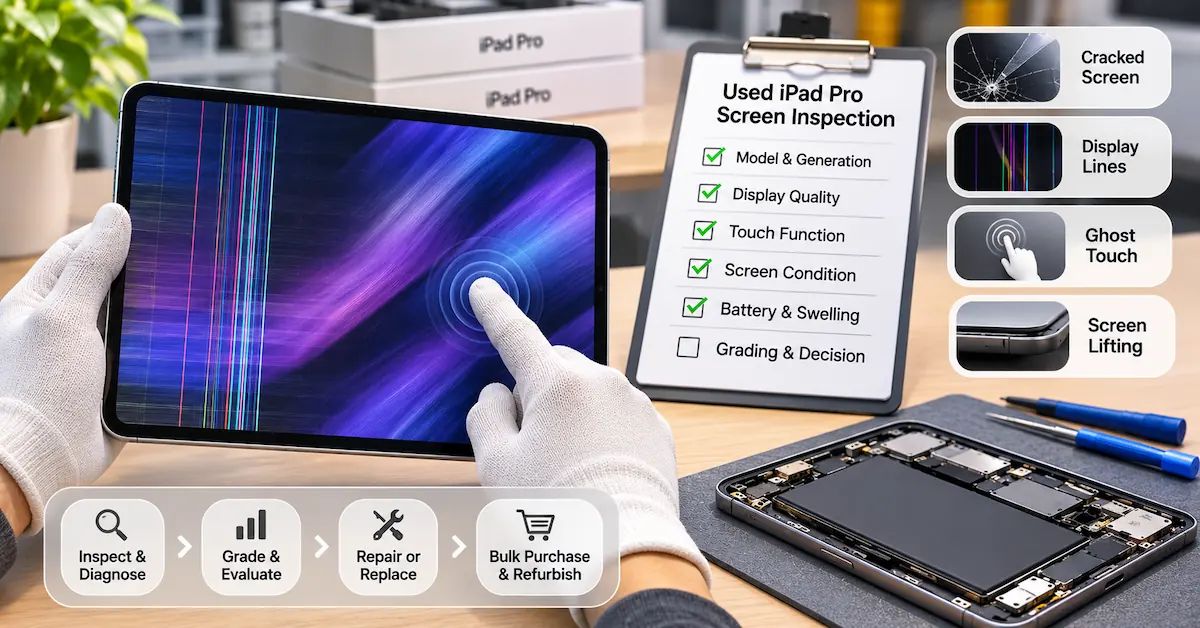
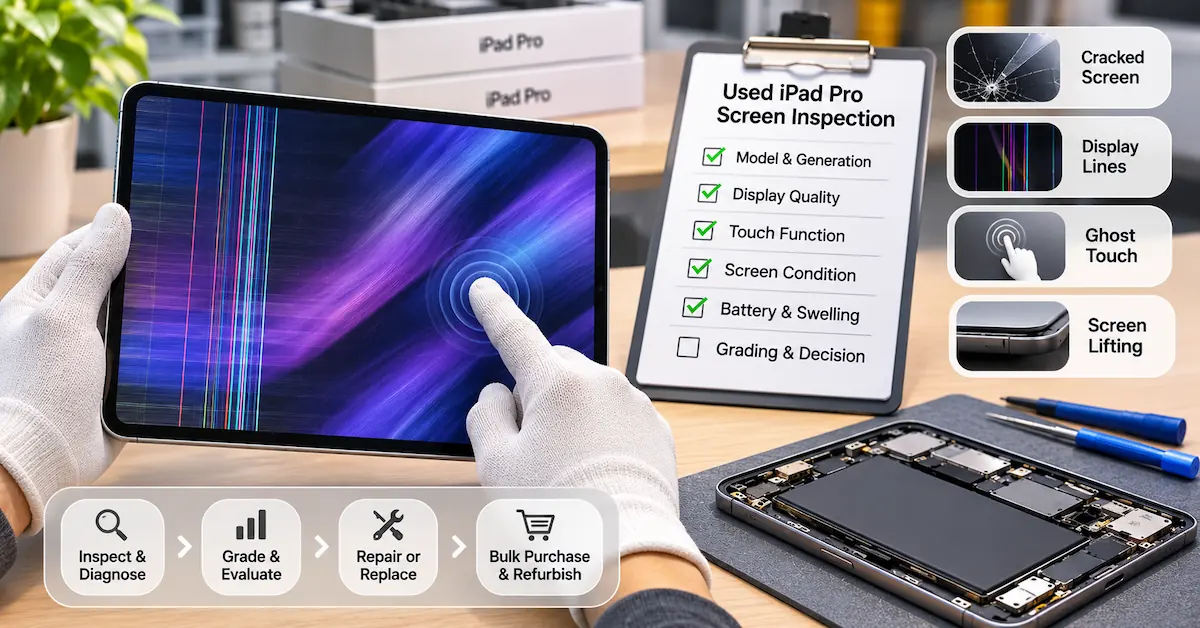
Quick Answer: When purchasing used iPad Pro devices, screen inspection should assess image quality, touch response, physical condition, display uniformity, and battery-related safety risks before assigning a resale grade. Different iPad Pro generations use LCD, mini-LED, or OLED displays, so test conditions and repair costs can vary. A device with minor cosmetic wear may remain commercially viable, while persistent lines, uncontrolled touch input, or suspected battery swelling can justify a repair hold or rejection.
For businesses buying used tablets in bulk, iPad Pro screen issues are not simply technical repair questions. They directly affect acquisition prices, refurbishment yield, inventory risk, and customer returns.
A device may look acceptable when the screen is off but reveal touch dead zones after startup. Another may show no image while the underlying problem involves charging or power delivery rather than the panel itself.
The challenge becomes greater when a batch includes several generations of iPad Pro.
An 11-inch LCD model cannot be evaluated using exactly the same display expectations as a newer Tandem OLED model. Likewise, visible screen lifting should not automatically be classified as an adhesive problem until internal battery pressure has been considered.
This guide provides a practical inspection and purchasing framework for used-device wholesalers, refurbishment facilities, repair chains, and tablet distributors.
For detailed component-level troubleshooting, see ESC's existing iPad Pro screen troubleshooting guide.
Here, the emphasis is different: how to decide whether a used iPad Pro is worth purchasing and what evidence is needed before accepting a batch.
Why Screen Condition Matters in Used iPad Pro Purchasing
A screen defect can influence the economics of a refurbished device in several ways:
-
Additional repair parts and labor
-
Lower resale classification
-
Longer inspection and repair time
-
Greater uncertainty about hidden hardware damage
-
Higher risk of customer dissatisfaction
-
More complicated warranty investigations
Not all visible defects carry the same commercial consequences.
A small cosmetic scratch that does not affect functionality may be acceptable for a disclosed lower cosmetic grade.
By contrast, an unstable image, persistent ghost touch, or unexplained display separation can affect the device's intended use and require additional technical assessment.
The correct purchasing decision depends on functional condition, repair feasibility, expected resale value, and safety—not appearance alone.
Identify the iPad Pro Display Technology Before Grading
Different generations of iPad Pro use different display architectures.
This matters because a buyer should distinguish actual defects from model-specific display characteristics.
iPad Pro display comparison
| iPad Pro family | Display technology | Important inspection priorities |
|---|---|---|
| Earlier 11-inch models, through 4th generation | Liquid Retina LCD | Backlight consistency, touch response, image defects |
| Earlier 12.9-inch models, through 4th generation | LCD | Backlight behavior, visible damage, touch function |
| 12.9-inch 5th/6th generation | Liquid Retina XDR mini-LED | Local dimming behavior, image uniformity, touch |
| 11-inch M4/M5 | Ultra Retina XDR Tandem OLED | Persistent image defects, uniformity, touch, physical damage |
| 13-inch M4/M5 | Ultra Retina XDR Tandem OLED | Same, with model-specific display and repair requirements |
Apple introduced Tandem OLED on both sizes of the M4 iPad Pro and retained this technology in the M5 family.
The older 12.9-inch fifth- and sixth-generation models use mini-LED backlighting.
Why this affects inspection
LCD and mini-LED displays use backlighting, while OLED pixels emit light individually.
Consequently, the visible characteristics of dark scenes, local contrast, brightness transitions, and panel uniformity can differ.
For example, some halo-like effects around bright objects on dark backgrounds may relate to mini-LED local dimming rather than a damaged display.
However, persistent lines, missing image areas, abnormal flicker, or nonresponsive touch require further investigation regardless of panel type.
B2B purchasing rule: Identify the exact iPad Pro generation before establishing inspection standards or estimating replacement costs.
How to Inspect a Used iPad Pro Screen Before Buying
A practical screening process can be performed without opening a device that is safe to operate.
For high-volume refurbishment, create a consistent inspection station with standardized lighting and approved test procedures.
Step 1: Verify the exact model
When the tablet is operational, open:
Settings → General → About
Record the model name and relevant model identifier.
If the device cannot be accessed, use external identification information and other legitimate records where available.
Do not rely solely on descriptions such as “iPad Pro 11-inch.”
Step 2: Inspect the enclosure and screen edges
Before powering on, look for:
-
Cracked or chipped glass
-
Bent or twisted enclosure
-
Uneven display gaps
-
Separation around the screen perimeter
-
Previous adhesive residue
-
Impact marks near display corners
-
Signs of liquid exposure
Safety priority: If screen lifting, deformation, unusual heat, or other evidence suggests possible battery swelling, stop ordinary inspection and refer the device for professional safety assessment. Do not press the screen back into position or charge the device simply to complete a test.
Step 3: Confirm startup and display operation
For devices without safety concerns, verify whether the screen displays an image normally.
If the iPad appears frozen or shows a black screen, Apple's model-specific restart guidance can be used before classifying it as a failed display.
For iPad Pro models without a Home button, Apple's force-restart sequence is:
-
Quickly press and release the volume button closest to the top button.
-
Quickly press and release the other volume button.
-
Hold the top button until the Apple logo appears.
If the device still does not start, further diagnosis is necessary.
A device with no image should not automatically be recorded as having a defective display assembly.
Step 4: Inspect screen image quality
Display appropriate solid-color and neutral test images using a consistent brightness setting.
Check for persistent lines, missing image regions, unusual discoloration, irregular brightness, and visible image retention.
Compare the result with a verified reference device of the same model where practical.
Step 5: Test the full touch area
Use an appropriate touch-testing method to inspect the center, corners, and edges.
Record dead zones, delayed response, unintended touches, or inconsistent input.
A working image does not guarantee that touch functionality is acceptable.
Step 6: Check relevant accessories and settings
Remove external accessories or protective films where appropriate and permitted.
Apple advises checking for screen contamination, disconnecting external accessories, and restarting when touch is intermittent.
If testing requires an Apple Pencil, verify that the Pencil is compatible with the exact iPad model.
Step 7: Record the inspection result
Take standardized photos or videos of important defects and assign an internal condition code.
This creates evidence for purchasing decisions and supplier claims.
How to Grade iPad Pro Screen Issues for Refurbishment
A grading system should separate cosmetic condition from functional condition.
A single “Grade A/B/C” designation can be misleading when one device has minor glass scratches and another has persistent touch problems.
Proposed refurbishment grading framework
| Grade | Screen condition | Purchasing recommendation |
|---|---|---|
| A | Clean appearance; image and touch meet defined standards | Eligible for standard refurbishment |
| B | Disclosed cosmetic wear; full display and touch functionality | Eligible for reduced cosmetic grade |
| C | Repairable display or touch defect with confirmed economics | Conditional purchase |
| Hold | Unresolved black screen, intermittent faults or uncertain diagnosis | Additional assessment required |
| Safety Hold | Suspected swelling, battery damage or unsafe deformation | Stop ordinary testing |
| Reject | Repair cost or risk exceeds commercial acceptance limits | Reject or consider approved parts recovery |
These grades are a proposed internal business framework, not official Apple grading standards.
Each refurbishment company should define its own measurable cosmetic and functional limits.
Why separate grading categories?
Consider two used devices.
Device A has several light surface scratches but stable image quality and full touch response.
Device B appears cosmetically excellent but has intermittent ghost touches.
Device A may be commercially acceptable in a lower cosmetic grade.
Device B may require repair or rejection despite looking better in product photographs.
This distinction is essential for wholesale purchasing and accurate resale descriptions.
Which Screen Defects Need Different Inspection Methods?
Cracked glass
Cracked glass is a physical defect, even if the screen still displays an image.
Technicians should assess whether the damage affects touch performance or creates additional safety concerns.
Do not assume glass-only replacement is practical across every iPad Pro generation.
Screen flickering
Intermittent flickering may be associated with software conditions, panel electronics, connectors, or other hardware faults.
For a used-device buyer, the important question is whether the problem can be consistently reproduced and diagnosed.
If not, assign a diagnostic hold rather than treating the device as a fully functional unit.
Touch dead zones and ghost touch
Touch defects can make a tablet unsuitable for drawing, note-taking, and other precision tasks.
Test the complete usable surface, not only one application button.
A device with uncontrolled touch behavior should not pass full-functional grading.
Black screen
A black display may result from a display-specific fault or the entire device failing to operate.
Before pricing a screen replacement, determine whether the iPad can start, charge, and demonstrate other normal functions.
A black-screen device with an unknown cause carries more purchasing uncertainty than one with a confirmed, repairable display defect.
Image retention or nonuniformity
On OLED models, persistent image artifacts should be evaluated under standardized conditions.
On mini-LED models, consider how local dimming affects dark-scene appearance.
Do not classify normal technology-dependent behavior as a defect without comparison to an appropriate reference.
When Do Screen Problems Indicate Battery Risk?
Some apparent screen issues require a separate battery or power assessment.
A lifting display is the clearest example.
Possible explanations include degraded adhesive, previous repair workmanship, enclosure deformation, or internal pressure.
Battery swelling is one possible cause and must be evaluated before the screen is reattached.
Other symptoms, including unexpected shutdowns and abnormal charging, may indicate a power-system problem rather than a failed display.
Screen and battery purchasing decisions
| Observation | Initial commercial decision |
|---|---|
| Cosmetic scratch; all functions pass | Grade according to disclosure standard |
| Persistent colored lines | Obtain a confirmed display repair assessment |
| Ghost touch | Hold until functional cause is established |
| Black screen and uncertain power state | Hold for professional diagnostics |
| Screen lifting with suspected swelling | Safety Hold |
| Confirmed weak battery; display functions normally | Evaluate model-specific battery replacement |
| Battery replacement restores startup but image defect remains | Continue display diagnosis |
Important: Installing a new battery does not repair cracked glass, damaged display pixels, or a failed touch layer.
Battery replacement should only be approved when the battery or related power system has been adequately evaluated.
For B2B repair workflows, this distinction helps prevent unnecessary component purchases.
Should You Repair, Discount, or Reject a Used iPad Pro?
Refurbishment decisions should be based on expected contribution after all relevant costs.
A simple calculation is:
Expected Contribution = Net Resale Revenue − Acquisition Cost − Repair Cost − Inspection/Labor − Logistics and Fees − Warranty Allowance
For devices with uncertain faults, the buyer should also consider diagnostic risk and potential additional losses.
Illustrative acquisition comparison
The figures below are hypothetical and do not represent actual market prices or ESC quotations.
| Cost item | Device A: Minor cosmetic wear | Device B: Confirmed screen defect |
|---|---|---|
| Expected resale revenue | $360 | $360 |
| Acquisition cost | $180 | $180 |
| Display parts | $0 | $105 |
| Inspection and repair labor | $25 | $50 |
| Logistics and selling fees | $45 | $45 |
| Warranty allowance | $20 | $20 |
| Expected contribution | $90 | −$15 |
Although both devices may have the same expected resale price after refurbishment, the screen repair makes Device B commercially unattractive under these assumptions.
Calculate the maximum allowable repair budget
A buyer can work backward from the required contribution.
Maximum Repair Budget = Net Resale Revenue − Acquisition Cost − Nonrepair Costs − Target Contribution
If the expected revenue is $360, acquisition costs $180, nonrepair costs total $65, and the company requires $50 contribution, the maximum combined repair budget is $65.
Any repair exceeding that amount fails the target unless another commercial variable changes.
Three purchasing decisions
Buy: The device passes the defined technical standard and meets the contribution target.
Buy conditionally: The defect is diagnosed, repair feasibility is confirmed, and the purchase price reflects the full cost.
Reject or hold: Safety is uncertain, the fault is unresolved, or the repair economics do not meet the business requirement.
This approach is more reliable than purchasing a batch based only on visual appearance.
How to Manage iPad Pro Screen Issues in Wholesale Lots
Batch purchasing introduces risks that are less visible in single-device transactions.
A supplier may describe a shipment as “tested,” but the buyer still needs to know exactly what was tested.
Build a lot acceptance record
| Inspection field | What to document |
|---|---|
| Device identification | Exact model and generation |
| Display technology | LCD, mini-LED or OLED |
| Cosmetic grade | Scratches, cracks, frame condition |
| Display test | Image, brightness, color, lines |
| Touch test | Full-area response |
| Power status | Startup and charging behavior |
| Battery condition | Available health and diagnostic evidence |
| Safety observations | Heat, deformation, suspected swelling |
| Inspection status | Pass, conditional, hold or reject |
| Supplier reference | Lot, invoice or shipment identifier |
Use an agreed sampling plan
Not every lot requires the same inspection approach.
Buyers should select sampling intensity based on shipment size, historical supplier performance, device condition, and commercial risk.
The acceptance criteria should be agreed before the purchase.
For example, a buyer may require 100% functional screening of particularly high-risk devices while applying an agreed sampling method to routine incoming checks.
Any such threshold is a buyer-defined control, not a universal industry requirement.
Track returns by fault type
Avoid grouping every customer complaint under “screen issue.”
Track categories such as cosmetic damage, no image, display line defects, touch failure, charging failure, and battery-related shutdowns separately.
This helps determine whether returns originate from a display problem, a power problem, poor grading, or inadequate inspection.
When Does Replacement Battery Sourcing Become Relevant?
ESC specializes in replacement batteries for portable electronics, including iPad models.
Its tablet and laptop replacement battery range serves professional repair centers, refurbishment companies, and wholesale buyers.
When an inspection confirms a battery-related fault, the replacement must match the exact tablet model.
Example ESC iPad Pro battery options
| ESC product reference | Published application | Required purchasing action |
|---|---|---|
| A2369 | iPad Pro 11-inch, 3rd generation | Confirm device generation and exact battery configuration |
| A2042 | iPad Pro 11-inch, 1st generation | Verify compatibility independently |
| A2387 | iPad Pro 12.9-inch, 5th/6th generation | Verify physical and electrical requirements |
These references are battery identifiers, not proof that batteries or display parts are interchangeable across every iPad Pro version.
ESC publishes an iPad Pro 11 Gen 3 A2369 replacement battery.
Before ordering, buyers should request confirmation of the approved specification, compatibility, sample availability, and purchasing terms.
Battery quality-control priorities
For replacement battery procurement, confirm:
-
Model and battery reference
-
Electrical specifications
-
Physical dimensions
-
Connector and flex configuration
-
Sample installation results
-
Appropriate electrical and functional tests
-
Lot traceability
-
Packaging and transportation requirements
These checks support consistent battery replacement outcomes but do not replace screen grading.
For a broader purchasing procedure, see ESC's tablet replacement battery sourcing guide.
What Should B2B Buyers Request Before Purchasing Replacement Batteries?
A structured inquiry can reduce compatibility errors.
For an iPad Pro refurbishment project, include the exact iPad model, battery part reference, estimated quantity, required specifications, destination market, and sample-testing requirements.
Buyers should also clarify:
-
Whether the quoted part matches the approved original battery reference
-
Whether connector and mechanical specifications have been confirmed
-
What testing information is available for the actual battery model
-
What labeling or packaging customization is offered
-
What MOQ and delivery terms apply to the requested SKU
-
How nonconforming goods and warranty claims are handled
Do not assume that certifications, capacity claims, MOQ, or warranty terms are identical across all product models.
B2B Sourcing CTA
If your iPad Pro refurbishment inspection identifies battery-related problems, explore ESC's tablet replacement battery products.
You can also contact ESC with exact device models, battery references, and purchasing quantities to discuss compatible replacement batteries, sample approval, and wholesale requirements.
ESC's relevant verified offering is replacement batteries; this article should not be interpreted as a claim that ESC supplies iPad Pro display assemblies.
Frequently Asked Questions
1. What are the most important iPad Pro screen issues to check before buying a used device?
Inspect physical glass damage, display lines, brightness uniformity, touch response, image distortion, and screen separation. Buyers should also confirm startup and charging behavior and record any unresolved symptoms before assigning a resale grade.
2. Is a used iPad Pro with a cracked screen worth buying?
It may be, but only if the device is safe to assess, the fault is understood, a suitable repair option exists, and total refurbishment costs remain below the buyer's commercial limit. Cracked glass should not automatically be treated as a low-cost repair.
3. Why does an iPad Pro screen flicker intermittently?
Possible causes include software conditions, display electronics, connections, or other hardware faults. A buyer should document the operating conditions and seek reproducible evidence before treating the device as fully functional.
4. Can an iPad Pro with ghost touch pass refurbishment grading?
A device with unresolved ghost touch should not pass a full-functional grade. The issue may affect ordinary interaction and precision input. It should remain on hold until the cause is investigated and the device passes the agreed test.
5. Is screen blooming always a defect on mini-LED iPad Pro models?
No. Some halo-like effects around bright objects on dark backgrounds can result from mini-LED local dimming behavior. Inspection should compare the device with a verified reference under similar settings before assigning a defect classification.
6. What screen problems should buyers look for on OLED iPad Pro models?
Check for persistent image artifacts, unusual nonuniformity, missing image regions, damaged glass, and touch problems. Use repeatable test conditions and account for differences in brightness settings and panel behavior.
7. Can a weak iPad Pro battery cause black-screen symptoms?
A power or battery-related problem can cause the entire tablet to shut down, appearing to the user as a black screen. However, a working device with no visible image may have a display-related fault. The two situations require different assessments.
8. Is a lifting iPad Pro screen safe to purchase?
A lifting screen requires further evaluation because internal battery swelling is one possible cause. If swelling or another battery hazard is suspected, the device should enter a safety-hold process rather than being charged or pressed back together.
9. How can refurbished iPad wholesalers reduce screen-related returns?
Use exact model identification, written display and touch criteria, consistent inspection conditions, separate cosmetic and functional grades, documented lot acceptance, and defect-specific return tracking. Purchase prices should reflect repair costs and unresolved risk.
10. Does ESC provide replacement screens or batteries for iPad Pro refurbishment?
ESC's verified relevant product offering is replacement batteries, including model-specific iPad Pro battery products. The company should not be represented as a replacement-screen supplier without supporting product evidence. Buyers can contact ESC to confirm compatible battery configurations and purchasing requirements.
Conclusion
iPad Pro screen issues can significantly affect the profitability of used-tablet refurbishment, but the correct response is not always to replace the display.
For wholesalers and refurbishment facilities, the most important first steps are identifying the exact model, applying the appropriate display technology checks, and distinguishing cosmetic wear from functional defects.
A cracked screen may be repairable, but only when the complete repair cost supports the expected resale margin. Persistent touch failures or unexplained black screens create additional uncertainty, while suspected battery swelling demands a separate safety assessment.
A structured grading system helps buyers make consistent decisions across individual devices and mixed-generation lots.
By documenting inspection results, calculating the maximum repair budget, and separating display faults from power-system failures, businesses can make more defensible buy, repair, hold, and reject decisions.
When a confirmed battery problem requires replacement, ESC provides model-specific tablet battery solutions for professional repair, refurbishment, and wholesale applications.
B2B buyers can contact ESC to discuss compatible iPad Pro replacement batteries, sample verification, quality-control requirements, and bulk purchasing.
A profitable refurbishment program begins with accurate grading, disciplined purchasing, and appropriate replacement components—not with repairing every device that enters the warehouse.